
Set a narrow purpose for the cleanup
The database holds more than blog posts. It also contains Elementor layouts, user accounts, shop data and plugin settings. A table is a collection of records; a large or unfamiliar table is not automatically disposable.
If your aim is to recover a large amount of space, first identify which tables are largest. Deleting a handful of revisions will not resolve a rapidly growing activity log. For a slow dashboard, use the admin performance guide rather than assuming cleanup will make it faster.
1. Save a backup and establish what to keep
Follow the database export steps and keep the file away from the public website directory. Check that your backup includes all tables for this site and that you have a usable restoration method.
Ask other editors to finish their work before cleaning drafts or revisions. Revisions are previous saved versions used to recover an earlier page design or text. Keep them while a redesign or disputed edit is still in progress. On a shop, avoid removing orders, customers, sessions or scheduled actions as routine housekeeping.
2. Review trash and spam through WordPress first
- Open Posts > All Posts > Trash and review the items. Restore anything placed there by mistake. Select only unwanted items and use Delete Permanently.
- Repeat the review in Pages > All Pages > Trash. A page removed from navigation can still be needed for a campaign or future redesign, so confirm its purpose before deleting it.
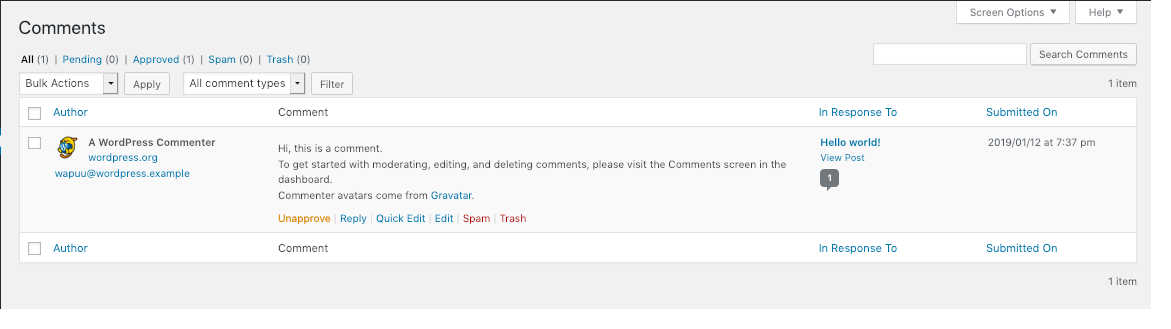
- Open Comments > Spam. Rescue legitimate comments marked incorrectly, then delete confirmed spam. Pending comments are awaiting a decision and should not be treated as spam automatically.
- Check the comments Trash separately. Once these visible categories are dealt with, decide whether another cleanup category is still necessary.
3. Use WP-Optimize for a selected database category
For expired temporary records or a deliberate revision cleanup, choose WP-Optimize from its official listing after checking compatibility, then follow the plugin installation steps. If another installed tool already performs this task, use one tool rather than scheduling overlapping cleanups.
Open WP-Optimize > Database > Optimizations. Review the selected boxes before running anything and clear the defaults. Leave caching, image compression and minification settings unchanged because they are separate features.
- Read the description and count for the category you intend to clean. Expired transients are temporary saved values whose expiry has passed; they are different from all transient values.
- Select only the expired-transient cleanup for an initial focused run. If you have instead agreed to remove revisions, select that category only and acknowledge that the saved editing history will be removed.
- Leave unapproved comments, metadata, unused-table removal and table optimisation unselected unless you have separately established that those actions are appropriate.
- Confirm your backup exists. If using the plugin's UpdraftPlus backup option, verify that the backup succeeds rather than treating the checkbox as proof. Select Run all selected optimizations once.
- Wait for the result and record the category and number of records removed. If the operation reports an error, save that message and stop before retrying or expanding the selection.
4. Test the site and interpret the result
Open a recent page, load its editor and verify that the intended content remains. Test your contact form with your own address. For a shop, check products and cart behaviour without clearing customer sessions. If you removed revisions, check that the current published page is intact and understand that older versions are no longer available through its revision history.
A lower record count does not guarantee an immediate reduction in the host's reported disk usage. Database engines can retain allocated space for reuse. Do not force a table rebuild merely because the storage chart has not changed; ask the host to interpret the size and advise whether maintenance is needed.
If expected content disappeared, stop new edits and investigate the exact cleanup before restoring. Use the saved backup through the planned recovery route, with special care for orders or submissions received afterwards.
5. Prevent the same data from accumulating unchecked
Review retention settings in the plugin that generates large logs or records. Set a documented retention period suited to the business instead of periodically deleting whole tables. Leave automatic cleanup disabled until you have verified a manual run and chosen categories that remain safe to remove without individual review.
Official references
The developer documents WP-Optimize's database controls. WordPress explains how revisions preserve earlier versions of content.
Get help with the next step
If a large table has an unclear purpose, ask BugShield for help before deleting it. The table name, size and plugin responsible are more useful than running another broad cleanup.