
Confirm that the database is the storage problem
Check the host's storage breakdown for the website. Database space is different from media uploads, backups and file-based logs. Open Tools > Site Health > Info > Directories and Sizes for WordPress's available size information, then compare it with the host's report. A large uploads folder needs file management, not deletion of database rows.
Record the current database size and the time. Ask the host whether the figure includes allocated space, indexes or other databases in the account. If the aim is faster page loading rather than storage, measure the slow action separately using our admin performance guide. A smaller database does not automatically make every request faster.
Get a list of the largest tables
A table is a named collection of database records. Ask your host for the largest tables in this site's database, including their data size, index size and approximate row count. Request the same report later if growth is rapid. Table names and sizes are enough to start; you do not need to send customer records or database passwords.
If WP-Optimize is already installed, open WP-Optimize > Database and inspect its Tables information. Use it to record sizes without selecting removal or optimisation actions. The developer's table information guidance explains its database reports. Otherwise, a host-provided report avoids installing a cleanup tool solely to inspect storage.
Identify the plugin or WordPress feature responsible for each large table. A shared naming prefix is a clue, not proof of ownership. Tables belonging to an inactive plugin can still contain data you intend to keep, and shop orders can live in several supported storage structures. Do not drop unfamiliar tables based on their name or a tool's unused label alone.
Back up before agreeing what can be removed
Create a fresh database backup and verify that it contains this site's tables. Our manual backup guide covers exporting the database, and the restoration guide explains the recovery route. Keep the backup outside the public website directory. A backup checkbox without a completed backup is not a recovery plan.
Agree what must remain available: order history, customer accounts, form submissions, audit records and editing revisions can have ongoing business uses. A live database restore also affects records created after the backup, so test unfamiliar cleanup on a staging copy first and plan the live run around active orders and edits.
Remove a confirmed category through its owning tool
For visible unwanted content, review Posts > All Posts > Trash, the equivalent Pages view and Comments > Spam. Restore anything misclassified and permanently delete only confirmed unwanted items. An unapproved comment or saved draft is not automatically disposable.
When revisions or expired temporary records are the agreed target, use our focused database cleanup guide. It shows a selected-category workflow instead of an all-options cleanup. WordPress revisions preserve earlier page versions, so removing them sacrifices that editing history even when the current page remains.
For a plugin-owned log or submission table, open that plugin's documented retention or cleanup settings. Preview the affected dates or count where available, export records the business needs, and remove a small agreed batch first. Do not clear whole tables or use a general cleaner's orphaned-data option without confirming the relationships it removes.
Address logs and background work at the source
For WooCommerce's own logger, open WooCommerce > Status > Logs > Settings and inspect storage and retention. Database storage consumes database space; file storage consumes filesystem space. Set a retention period that preserves the diagnostic history you need. Changing storage does not move or delete existing entries, as the logging reference explains.
A rapidly growing scheduled-action table needs its jobs investigated. Under WooCommerce > Status > Scheduled Actions, compare repeated failures, overdue tasks and future work using the scheduled-action guide. Pending work can include future renewals. Keep those records and the failure evidence while the responsible plugin or host repairs the cause.
If the options table is the concern, distinguish its overall size from the settings loaded on every request. Our autoloaded-options guide covers that separate problem. Deleting a large setting without knowing its owner can remove configuration rather than clutter.
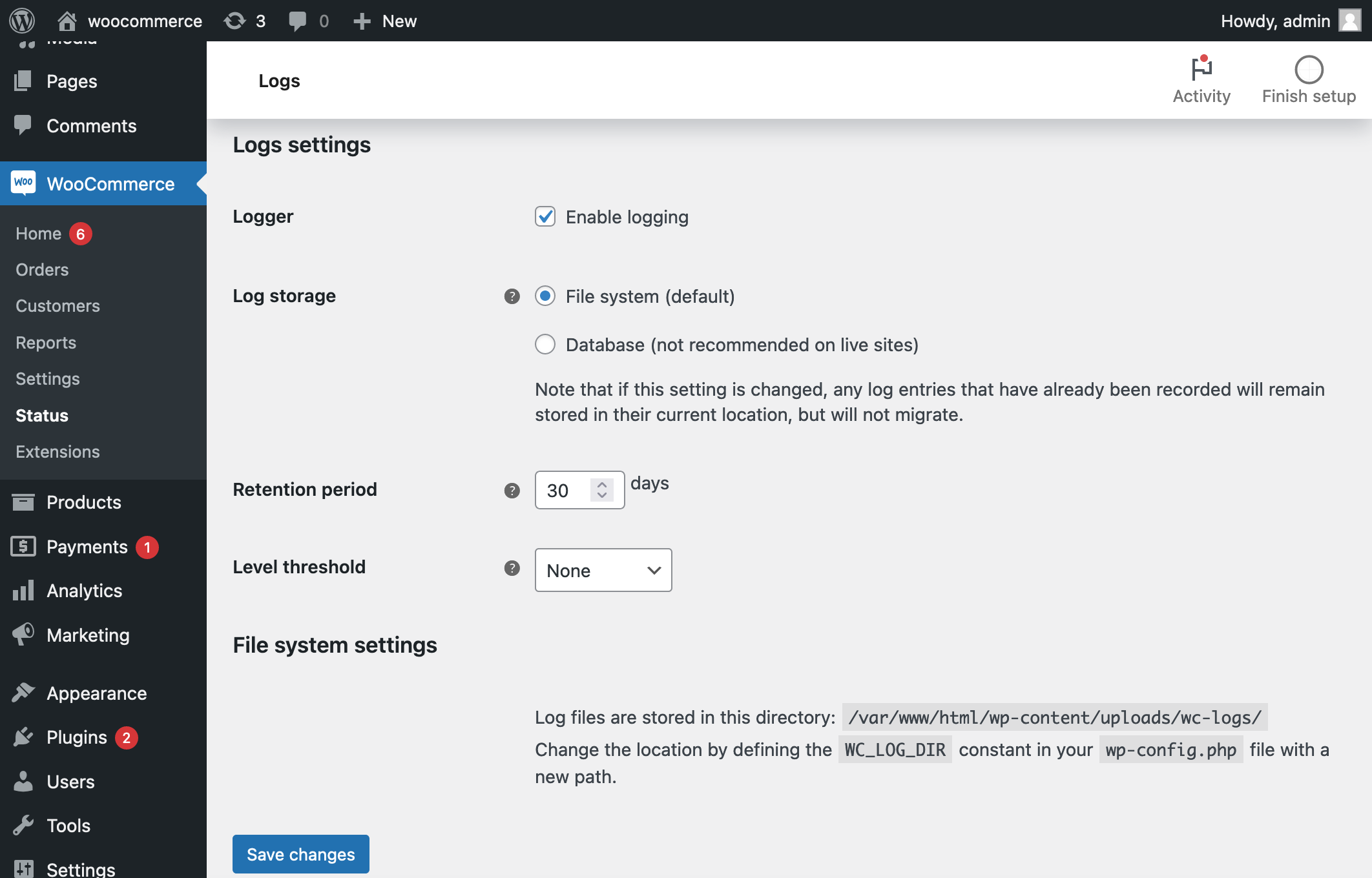
Measure the result and watch for renewed growth
After a targeted cleanup, reopen representative pages and their editors, test forms and check shop records and account access. Compare the affected table's count and size with the earlier report. A database engine can retain freed space for reuse, so the host's disk figure does not have to fall immediately when rows are removed.
Ask the host whether any table maintenance is appropriate before attempting a rebuild. Large rebuilds can require extra disk space and affect availability. Track the same table over the following days; if it grows rapidly again, the generating process still needs attention. Schedule only a cleanup whose categories and retention rules have already been verified.
Get help with the next step
If you have a large table but cannot establish what is safe to remove, BugShield can help identify the data and its owner before planning a targeted reduction.