
Prepare a matching backup set
You need your hosting login, access to its File Manager and phpMyAdmin database tool, and enough storage on your computer. These instructions cover a standard single WordPress site. For a multisite network or media stored with an external service, ask your host which additional data the backup must include.
Choose a quiet period and pause editing until both downloads are complete. On a shop, booking site or membership service, ask the host for a consistent backup that accounts for ongoing transactions. A file copy taken hours after a database export can miss changes made between them.
1. Locate the correct website and database
Sign in to your hosting account and select the correct domain. Open its File Manager and the document root, meaning the folder served for that website. Its name varies by host; do not assume the first public_html folder belongs to this site.
- Look for
wp-admin,wp-contentandwp-includestogether. Openwp-config.phpusing View rather than Edit. - Note the value beside
DB_NAME. That is the database to export. The$table_prefixvalue identifies this site's table names within it. - Check with the host if the configuration is outside the folder, uses environment variables or points to a shared database. Do not guess or copy a database belonging to another site.
2. Download a complete database export
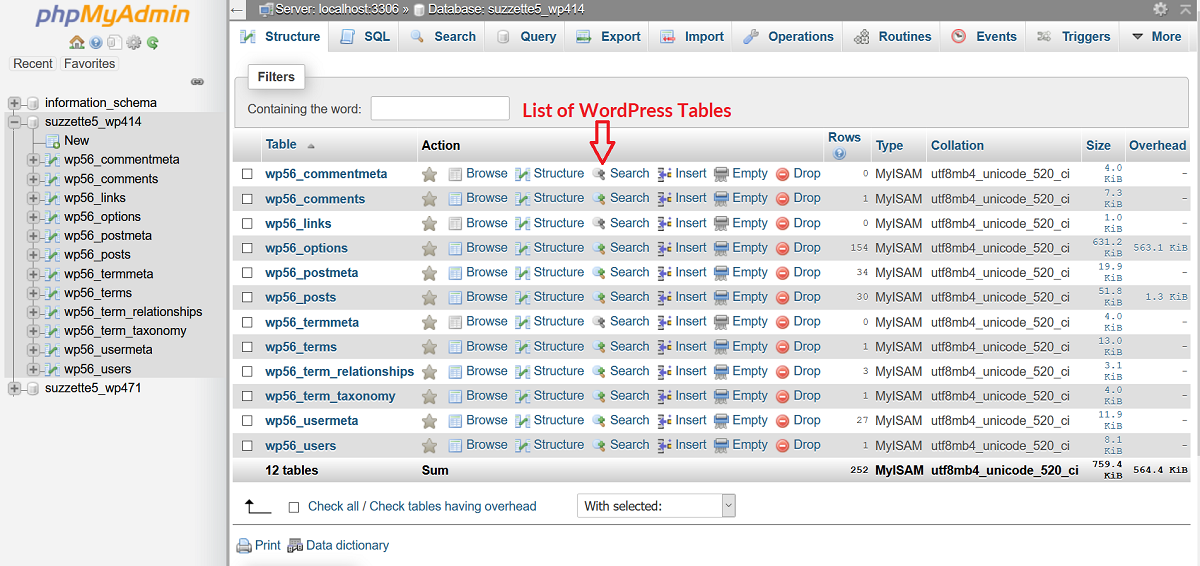
Open phpMyAdmin from the hosting panel. Select the database you identified, so that its table list appears. For a database dedicated to this site, use the following export process.
- Select the database-level Export tab, rather than exporting a single table such as posts.
- Choose Quick and the SQL format, then select Export or Go.
- Save the download in a dated folder on your computer. Check that it has a non-zero file size. Open a small export in a plain-text editor and look for SQL statements such as
CREATE TABLE, not an HTML error page. Ask the host to check a file too large to open comfortably. - If the export times out or the host limits downloads, ask support for a complete export of the named database. Do not split or edit its contents to force it through.
3. Download the website files, including hidden files
Return to File Manager and enable its option to show hidden files. Select the contents of the website directory, including wp-content, the WordPress core folders, wp-config.php and .htaccess if present. Some hosts use a different server configuration and have no .htaccess file.
Use the host's download or archive feature to copy them to your computer. If creating a ZIP on the server, place it outside the public website directory where the host permits this. A backup left at a public web address can expose private site data. Ask the host for a private archive location if the tool offers only public folders.
Large sites need sufficient free server space to create an archive. If compression fails, use your host's secure file-transfer instructions or request a file backup from support. Check the download completes before closing the session. Keep external media and any configuration outside the website directory with this backup set.
4. Check the files and keep a protected second copy
Open the downloaded archive on your computer. Confirm it contains the expected folders and open a few recent images from wp-content/uploads. Place the SQL export beside the archive, with a private note recording the domain, backup date, timezone and any excluded external services.
Keep another copy in protected storage away from the hosting account. Limit access because backups contain customer information, private content and credentials. After confirming both local downloads, remove only the temporary archive you created on the server, not the website folder or its contents.
These checks establish that you downloaded readable files. To establish that the site can be recovered, prepare an isolated staging environment and follow the backup restoration guide. Never test a restore by overwriting the working live site.
Official reference
The WordPress handbook explains the separate database and file components of a backup and their export options.
Get help with the next step
If the database is unclear or the download keeps failing, ask BugShield for backup help. We can help establish what needs saving before you make a change that depends on being able to restore it.