
Use the right procedure for your type of move
This procedure covers a standard single WordPress site changing domain while keeping its page paths and installation location. A multisite network or a site with WordPress installed in a separate directory needs a specific migration plan. Do not make two address fields identical merely because an example does.
If only the hosting company changes and the public address stays the same, follow the hosting migration guide. For an HTTP-to-HTTPS change on the same domain, use the HTTPS guide after the certificate works.
1. Make the new address ready before changing WordPress
Confirm you control both domain registrations and the hosting account. Ask the host to attach the new domain to this website's existing directory, configure the necessary DNS records and issue an HTTPS certificate for the chosen address. DNS records tell browsers which server serves the domain. Keep mail records unchanged unless an email migration is also planned.
Choose one final form, including HTTPS and whether to use www. Ask the host to verify that the new name reaches the intended installation without a certificate warning, even if WordPress currently redirects back to the old address. Do not continue while the name reaches an unrelated site or shows an HTTPS error.
Take a complete backup, record the old address fields and arrange a low-activity change window. Keep hosting File Manager available for recovery. On a shop, plan the payment-provider, callback and customer-session implications before changing the address.
2. Change the WordPress address fields
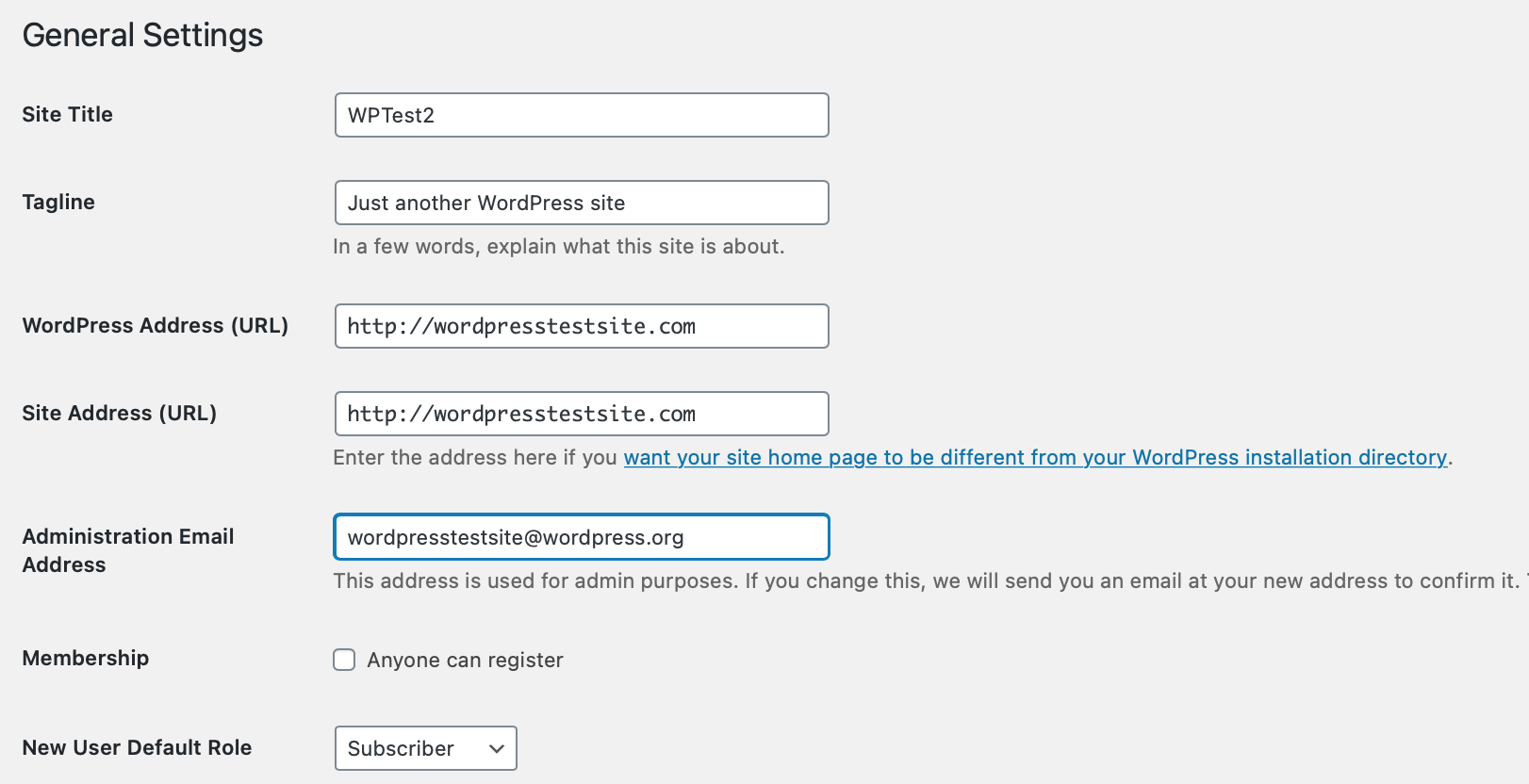
- Open Settings > General. Record WordPress Address (URL) and Site Address (URL) exactly as they are.
- For a standard root installation with matching fields, replace the old domain in both with the prepared new HTTPS address. Preserve any required installation path and do not add a trailing slash.
- Select Save Changes. Expect to sign in again at the new domain because the old login cookie does not transfer between domains.
- If either field is disabled, inspect the host-managed configuration with support.
WP_HOMEandWP_SITEURLcan override database settings. Do not add duplicate definitions to force the change.
3. Replace saved links with a controlled dry run
The address fields do not rewrite every image and link saved in content. Use a tool that understands WordPress's structured saved data, such as Better Search Replace. Do not use a text editor to replace words in an SQL export.
After installing the current plugin, open Tools > Better Search Replace. Save another database backup before a live replacement. This step changes records and needs careful scoping even though it uses dashboard controls.
- Enter the complete old address in Search for, including its actual
http://orhttps://prefix, and the prepared new HTTPS address in Replace with. Search for the actual old address, not a broad word such as the business name. - Select only the tables belonging to this WordPress installation. Use the table prefix in wp-config.php to identify them; exclude staging and other sites' tables. Ask the host if ownership is unclear.
- Leave Replace GUIDs unselected and keep Run as dry run selected. Run the search and inspect its reported tables and match counts. A dry run reports matches without changing the database.
- If the addresses, tables and counts make sense, repeat with the same scope and the dry-run box cleared. Wait for completion and record the result. Stop if an error appears rather than rerunning across a wider selection.
4. Check Elementor and the site's main journeys
For Elementor, open Elementor > Editor > Tools in current versions, or Elementor > Tools in older versions. In Replace URL, enter the old and new full addresses and run the replacement. Under General, select Clear Files & Data and save. Review the Elementor licence assignment for the new address.
Clear the relevant site and hosting caches. Open the homepage, an inner page, images and menus in a private window. Check desktop and mobile layouts, submit a form to yourself and verify the message arrives. A broken image that still points to the old address needs its remaining saved reference corrected.
If inner pages return 404, save the current structure under Settings > Permalinks. Review payment connections, sign-in integrations, analytics and email sender settings with their providers. Their registered URLs can need updates outside WordPress.
5. Redirect old pages and check search settings
Ask the host to create permanent redirects from each old address to its matching new address, preserving page paths. An old contact page should reach the new contact page, not the homepage. Keep the old domain and its HTTPS certificate active so visitors using old secure links can reach the redirect.
Test several old page and image addresses. Review your SEO plugin's canonical URLs and sitemap to confirm they use the new domain. Remove any temporary staging indexing restriction from the live site, verify the new property in Google Search Console and submit its new sitemap. Follow Google's Change of Address process when the move qualifies, and retain redirects for at least one year as Google recommends.
Monitor broken links, forms and search reports after the move. If the new site cannot be reached immediately after changing the fields, ask the host to restore the recorded address values through the correct configuration or database. Avoid reversing a completed database replacement by guesswork.
Official references
See WordPress address settings, Elementor's URL-change procedure and Google's guidance for domain moves.
Get help with the next step
If the domain move involves a shop or you are unsure which records belong to the site, ask BugShield to help plan the migration. We can help coordinate the address change, checks and redirects before the old links stop working.