
Confirm the page itself already loads over HTTPS
Open the affected page and inspect its address. If a certificate privacy warning blocks the whole page, use the certificate-error guide first. Mixed content is a resource-loading problem inside a page that uses HTTPS.
Browsers upgrade some insecure resource requests to HTTPS automatically and block others. A page can therefore look correct while still storing old links. Keep a note of the affected page and what is missing, such as a background image or a payment field, so you can repeat the same test after the change.
1. Find the resource named in the browser warning
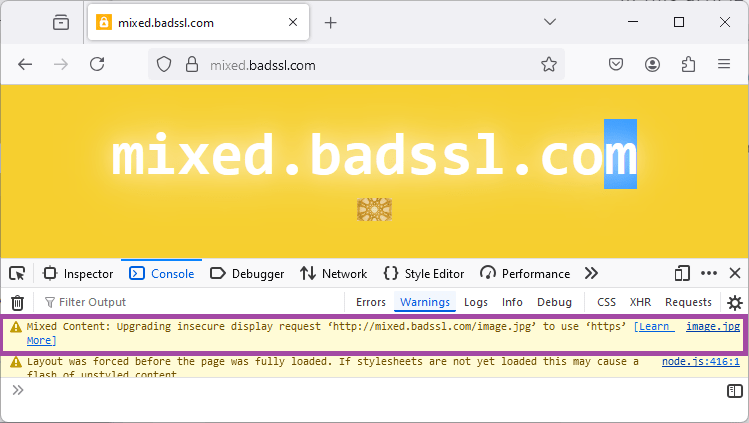
- In Chrome or Edge, right-click the affected page and select Inspect. Open the Console tab in the panel that appears, then reload the page.
- Find a message containing Mixed Content. It identifies the HTTPS page and the requested HTTP resource. Copy the resource's address into a private note.
- Compare its hostname with your own domain. A path under
wp-content/uploadssuggests saved media; a different domain can belong to an embedded service or plugin. - For a known image you own, open its address in a new tab with
https://instead ofhttp://. If it loads without a certificate warning, the secure address is available to use. Do not test an unfamiliar script by running or downloading it.
2. Correct one image or embedded resource at its source
For a page image, open that page in WordPress and select the image. Replace its old custom URL with the verified HTTPS address, or choose the image again from the Media Library. Update the page and reload the public version. Check links inside reusable blocks, widgets and the theme customiser if the resource appears across several pages.
In Elementor, select the image widget or the container holding a background image. Choose the image again in its Content or Style controls as appropriate, then update the page. If the warning concerns an external embed, replace its snippet with the current HTTPS embed supplied by that provider. A third-party service without working HTTPS needs removal or a supported alternative, not a global browser-security bypass.
If the URL comes from a plugin rather than editable page content, inspect that plugin's documented URL setting and available update. Send its developer the warning and page location if the address is hardcoded. Editing a plugin file directly leaves a change that an update can overwrite.
3. Update repeated old URLs after an HTTPS change
If many resources still use your own old HTTP address, first confirm Settings > General uses HTTPS for the WordPress and site addresses. Preserve any existing installation path. If the fields are locked, ask the host to check the configuration overrides.
Take a database backup, then follow the scoped Better Search Replace procedure. For this task, search for your complete old HTTP site address and replace it with the matching HTTPS address. Keep the domain unchanged, select only this site's tables, leave GUID replacement off and inspect a dry run before applying it.
Never replace every occurrence of http across the database. That also affects unrelated domains and stored text. The backup and dry run are required even when the intended change is only one letter in a URL.
4. Refresh Elementor files and relevant caches
For an Elementor site-wide HTTPS change, open Elementor > Editor > Tools, or Elementor > Tools in older versions. Use Replace URL with the exact old HTTP and new HTTPS site addresses. Under General, select Clear Files & Data and save.
Clear the affected page, hosting and CDN caches. Reopen the public page in a private window, inspect Console and reload. Confirm the old warning no longer appears, the resource loads and the original feature works. Test the relevant form or checkout interaction as well as the page's appearance.
If the same URL remains, identify whether it is still present in saved content or supplied by an old cached file. Record the source before changing another setting. A clean check on one page does not cover every page template on the site, so repeat it on the affected templates.
Official references
Mozilla explains how browsers handle mixed content. Elementor documents its URL replacement and file-refresh workflow.
Get help with the next step
If the warning points to a plugin or a resource you cannot locate, ask BugShield to help trace it. Send the affected public page and the resource hostname, leaving private links and tokens out of your message.