
Prepare a recoverable change
A redirect does not install a certificate. Open the exact HTTPS address first. If the browser shows a privacy warning, follow the certificate guide before adding a redirect. Cover both the main domain and www if visitors use both.
Record current WordPress address fields and any existing HTTPS controls, then take a backup. Keep your hosting login available. Choose one method below for the redirect; do not add hosting rules, a new plugin and custom server code together.
1. Check the WordPress addresses
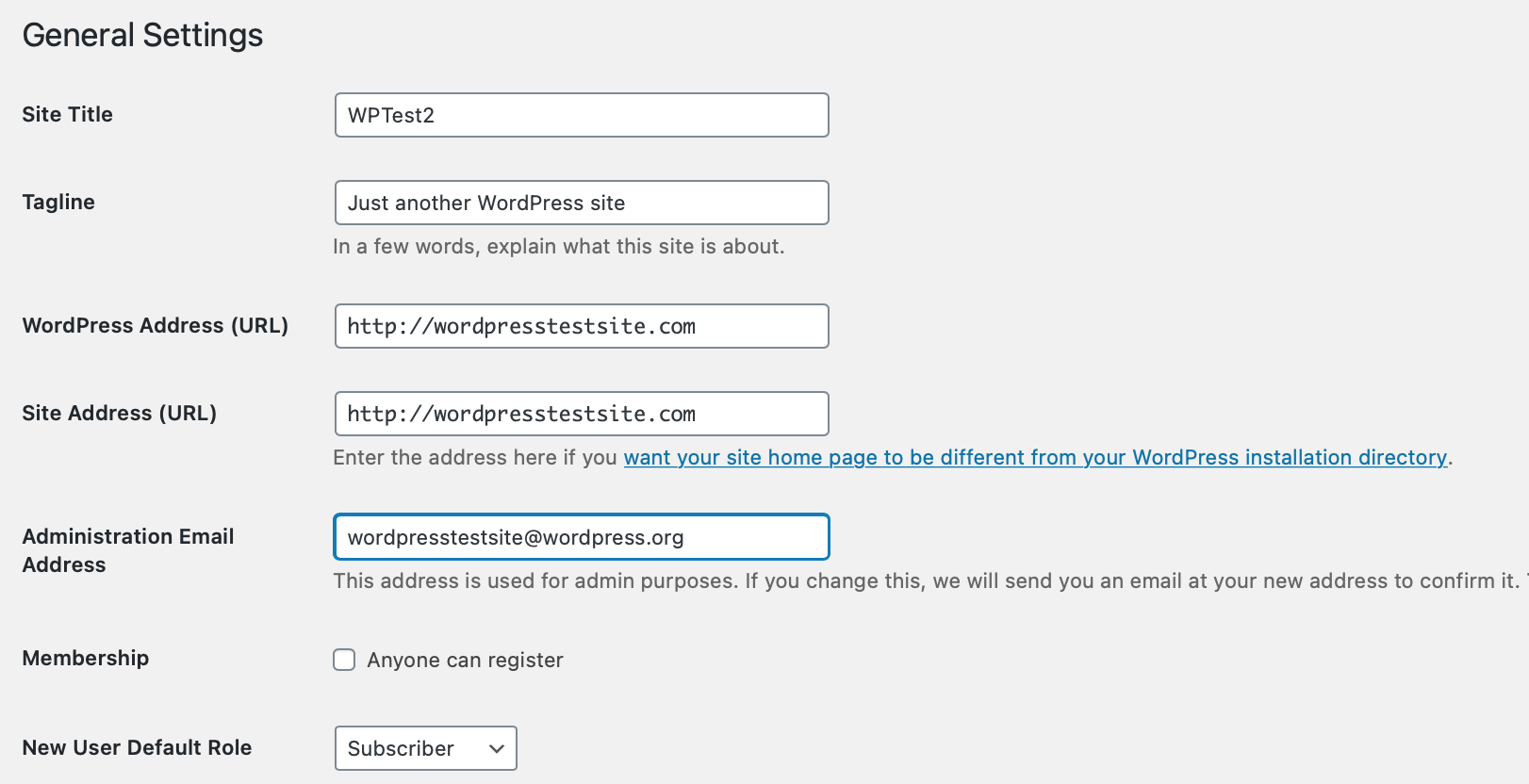
Open Settings > General and inspect WordPress Address and Site Address. Once HTTPS works, change only the http:// prefix to https:// where required. Preserve the existing hostname and any installation path, then save. Sign in again at the HTTPS address if WordPress signs you out.
If the fields are locked or intentionally differ because WordPress lives in a subdirectory, ask the host to verify the configuration. The address-change guide explains these fields and scoped link replacement. Do not paste example domain constants into your site's configuration.
2. Enable the hosting redirect for a directly hosted site
Use this route if your hosting provider manages HTTPS redirection. The example below uses cPanel; another hosting panel needs its documented Force HTTPS or equivalent control.
- In cPanel, open Domains and locate the exact website in the domain list. Confirm its document root belongs to the intended WordPress installation.
- Set Force HTTPS Redirect to On for that domain. If the control is unavailable, ask the host whether a valid certificate is installed and whether it manages redirects elsewhere.
- Leave other domains and existing mail settings unchanged. Note which switch you changed so you can turn it off again if this specific change causes a loop.
Alternative: use Cloudflare's HTTPS control
If the domain is actively proxied through Cloudflare, select it in the Cloudflare dashboard. Check SSL/TLS first. Full (strict) needs a valid matching origin certificate; ask the host to prepare that connection before changing encryption mode.
Open SSL/TLS > Edge Certificates and enable Always Use HTTPS. This applies to requests handled by Cloudflare. Confirm the relevant DNS entries are actually proxied; a DNS-only hostname does not pass through this setting.
If the origin already redirects HTTP to HTTPS while Cloudflare uses Flexible mode, the two sides can loop. Repair the origin HTTPS connection and align the encryption mode instead of adding another redirect plugin. Keep any required host protections documented, and change one control at a time.
3. Verify the actual redirect
In a fresh private browser window, explicitly type an http:// address for an existing inner page. It should end at the HTTPS version of that same page. Repeat for the homepage and each public hostname. Landing on the homepage instead of the requested inner page indicates a redirect that is not preserving the path.
Modern browsers can upgrade HTTP themselves, so the address bar alone does not prove a server redirect exists. For a firm check, ask the host to confirm an HTTP response redirects to the intended HTTPS URL with a permanent redirect status, such as 301 or 308, and no loop.
Sign in, submit a test contact form and check checkout if you run a shop. If the page works but images or scripts are blocked, follow the mixed-content guide; those saved URLs are a separate cleanup task.
4. Recover if the browser reports too many redirects
Undo the last redirect switch you enabled and test again in a fresh browser session. Restore a recorded address value only if it was entered incorrectly; do not downgrade a valid HTTPS site as a blanket fix. If the loop persists, send the host the start address, final error and controls recently changed.
Ask support to inspect conflicting HTTPS or www rules across the host, Cloudflare and WordPress. Server type and proxy configuration determine which rule is appropriate, so copying a generic Apache snippet into a different setup is not a reliable repair. Use the login-loop guide if only authentication is affected.
Official references
See cPanel's Domains and Force HTTPS controls, Cloudflare's Always Use HTTPS setting and its redirect-loop troubleshooting.
Get help with the next step
If HTTPS works directly but redirecting visitors causes a loop, ask BugShield to check the redirect settings. We can help identify which layer is sending visitors back to the previous address.