
Choose the method for the access you still have
Your WordPress login is separate from your hosting login and your WordPress.org account. Check the address bar before entering a password: it should show your own website and HTTPS. A security plugin can change the usual login address; use your saved address if that feature is enabled.
Use the email method first. The administrator and database methods below are alternatives if that fails, not extra steps to complete afterwards. Reset only an account you own or have permission to administer.
1. Request and use the password reset email
- Open your site's login screen. For a standard installation, add
/wp-login.phpto the site's address, then select Lost your password? - Enter the username or email address belonging to your WordPress user profile. This can differ from the site's general contact address. Select Get New Password.
- Check that inbox and its spam folder. Open the newest reset message and follow its link. If the link has expired, request a fresh one and use that message only.
- Accept the generated strong password or create a unique password in your password manager. Save it before selecting Save Password or Reset Password, depending on your screen.
- Return to the login page and sign in. If your password manager fills the previous password, replace it with the new saved value.
2. Ask another administrator if email recovery fails
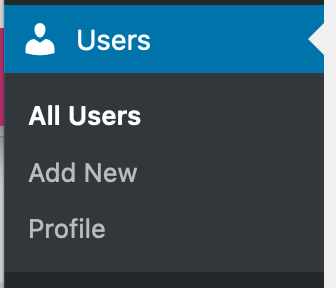
An existing administrator can open Users > All Users, select your username and check the email address in your profile. If you can receive mail at that address, they can use Send Reset Link under Account Management.
If site email is broken, they can use Set New Password, save a unique temporary password and select Update User. Have them share it through a secure password-sharing method, then replace it yourself in Users > Profile after signing in. They do not need to create a second administrator account.
When nobody else has administrator access, ask your host whether its WordPress management screen includes account recovery. Prove account ownership through the host's normal support process. Do not send your current password to support.
3. Use phpMyAdmin only when the simpler routes are unavailable
phpMyAdmin is your host's database editor. A database holds your site's saved content and account records. Before changing it, export a database backup. If you cannot identify the correct database or user, stop and ask the host to perform this reset.
- In the hosting panel, open the site's File Manager and view wp-config.php beside
wp-adminandwp-content. Note the value ofDB_NAMEand the$table_prefixvalue without changing them or sharing the file. - Open phpMyAdmin from the hosting panel and select that database. Find the table ending in
userswith the matching prefix, such aswp_users. - Select Browse. Match both
user_loginanduser_emailto your account, then select Edit for that row. Do not assume user number 1 belongs to you. - On the
user_passrow only, select MD5 in the Function column and replace the Value with a unique temporary password you have saved privately. Leave every other field unchanged. - Select Go to save and sign in through WordPress. WordPress accepts this temporary legacy hash and replaces it with its current password format after successful authentication.
- Open Users > Profile > Account Management, set a fresh final password and select Update Profile. Sign out of phpMyAdmin when finished.
4. Check the result and investigate unexpected changes
A successful reset lets you reach the dashboard with the intended username and password. If you return to the login screen without a password error, follow the login redirect-loop guide. A lockout notice or two-factor prompt needs the security plugin's recovery process; another password reset does not remove those checks.
Check your profile email and review administrator accounts. If somebody changed them without permission, treat that as a security incident and ask for a site review. Once access is stable, enable two-factor authentication and store its recovery codes separately from your phone.
Official reference
WordPress documents the supported password recovery methods, including its phpMyAdmin fallback. Its login security handbook explains how legacy password hashes are upgraded. Screen labels vary between WordPress versions and security plugins.
Get help with the next step
If you cannot identify your account or the reset still leaves you locked out, ask BugShield to help recover access. Tell us which login screen or error you see and which recovery methods you have tried; keep passwords out of your message.