
Confirm that memory is the relevant setting
PHP is the software that runs WordPress on the server. Its memory limit caps the memory available to a single running request; it is not your site's storage allowance or your computer's RAM. An upload-size error or execution-time error needs a different setting.
If you see Allowed memory size exhausted, note the page or action that triggers it. Use the memory-error troubleshooting guide to investigate the cause. Increasing a limit creates room for work; it does not establish that the work is efficient or functioning correctly.
1. Find the current values in Site Health
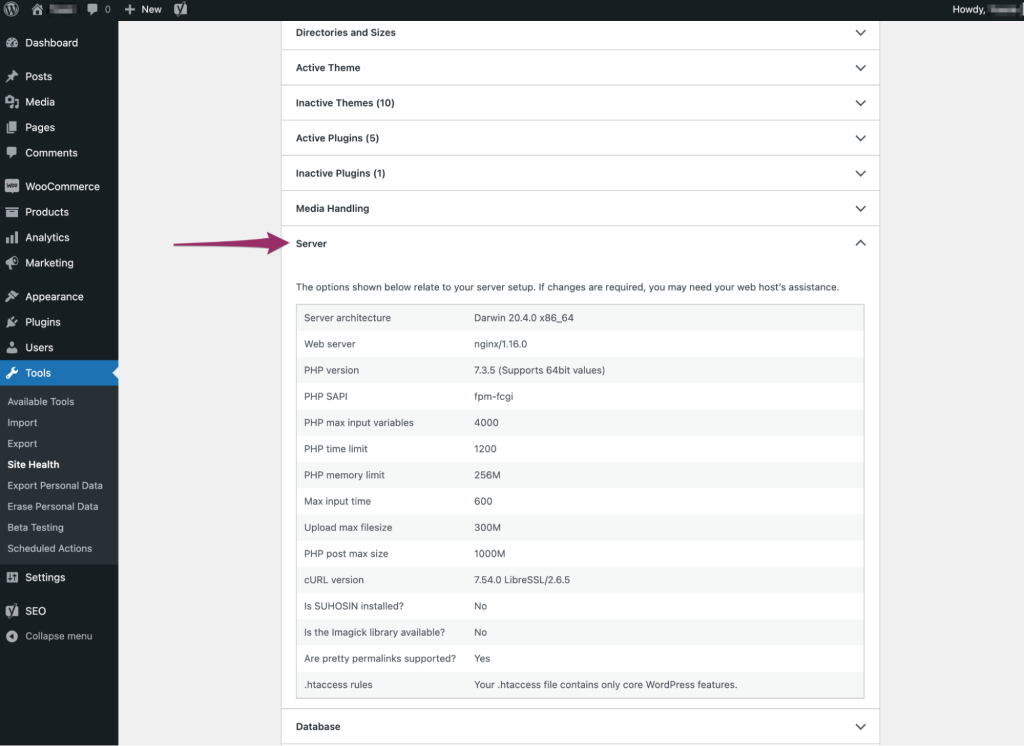
Open Tools > Site Health > Info. Expand Server and record the PHP memory limit, including a separate admin-only value if shown. Also expand WordPress Constants and note WP_MEMORY_LIMIT and WP_MAX_MEMORY_LIMIT when shown. The latter controls the higher limit WordPress requests for administrative work.
Record these values privately rather than sharing the entire Site Health report, which contains other site details. If the dashboard is inaccessible, ask your host to inspect the effective PHP memory limit for this website's web requests. A command-line PHP setting can differ from the one serving visitors.
2. Change the host's PHP setting first
In the hosting panel, select this website and find PHP settings or PHP options. Some cPanel accounts provide MultiPHP INI Editor; other providers expose the setting in their own site tools. Locate memory_limit and record its existing value.
Choose the value required by the affected plugin and supported by your plan. For example, if the effective limit is 128M and the plugin documents a 256M requirement, select 256M and save. Do not lower an existing larger limit to match that example or choose unlimited memory.
Reload Site Health to check the effective value. If it is unchanged, the field is locked or the option is absent, ask the host: Please confirm the PHP memory limit applied to this domain's web requests and whether the required value is supported. Include the current value and the task that fails.
3. Adjust WordPress's request only if necessary
Use this alternative only if effective PHP memory remains too low and the host confirms WordPress can raise it. A lower WordPress constant does not itself reduce an already higher effective PHP limit. First back up the site and download a private copy of wp-config.php through hosting File Manager. Keep the File Manager open so you can restore that copy if you make a typing error.
Search the file for WP_MEMORY_LIMIT. If already present, change that value rather than adding a duplicate. Otherwise place the following line above the stop-editing comment and before the line loading wp-settings.php. The example requests 256 MB; use it only when that is the supported value you established.
define( 'WP_MEMORY_LIMIT', '256M' );4. Verify the change and handle a failed test
Save the file, reload the public homepage and reopen Site Health. Repeat the exact failing action once. If the new effective limit is visible and the task completes, record the setting that worked. Administrative tasks also depend on WP_MAX_MEMORY_LIMIT; ask the host to check that value if only dashboard work remains limited.
If editing the file causes a new critical or syntax error, replace only that file with the untouched copy through File Manager. If memory still runs out at the higher limit, stop increasing it repeatedly. Collect a private error log and investigate the plugin or operation involved, or give the host the exact error and timestamp.
Official reference
The WordPress configuration handbook describes WordPress memory settings and their hosting limits.
Get help with the next step
If the editor still fails after a supported increase, ask BugShield to investigate the memory error. The failing task, effective limit and error time help us distinguish a setting problem from a faulty operation.