
Confirm the actual error
Look for Allowed memory size ... exhausted in the recovery email or hosting PHP log. The first number is the permitted memory in bytes; the later allocation figure is the additional amount PHP tried to obtain when it failed. Neither number tells you the total amount the unfinished task would need.
Record whether the error occurs when opening Elementor, uploading one large image, importing products or simply viewing a page. Note the time and latest plugin or PHP changes. If you only see a critical-error message, use the critical-error guide to obtain the underlying error first. An upload-size warning or maximum-execution-time message is a different limit.
Recover access and preserve the current site
Take a backup before changing configuration. If a recently changed plugin prevents the dashboard loading, use Recovery Mode or deactivate that identified plugin through hosting. Leave its feature unavailable until a tested repair is ready.
Ask your host to stop a stuck import or background job if it continues failing. Before restarting an import, check which records were already created and use the importer's documented resume or duplicate-handling option. Re-running the whole file without checking can create duplicate content.
Compare the current limit with the task's requirements
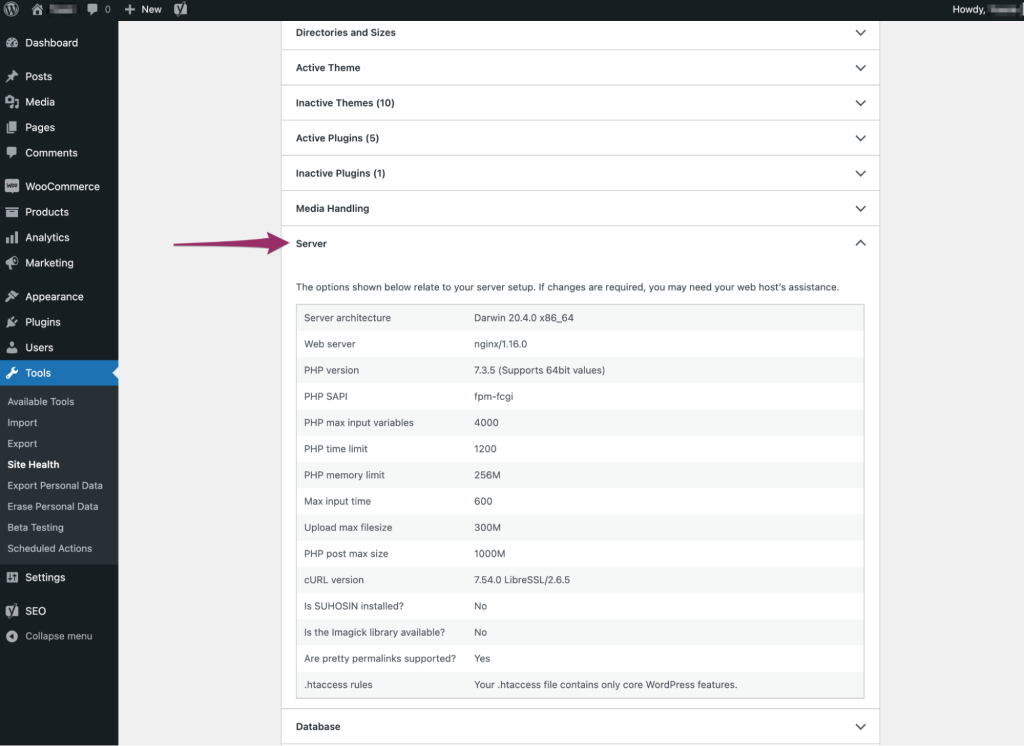
When the dashboard opens, go to Tools > Site Health > Info and expand Server. Record the PHP memory limit and any separate administrative value. Under WordPress Constants, note WP_MEMORY_LIMIT and WP_MAX_MEMORY_LIMIT where available. Ask hosting support for the effective web-request value if the dashboard is inaccessible.
Check the affected plugin's current official requirements and give the host that requirement alongside the error. If the effective limit is below a supported requirement, follow the memory-limit setting guide. It covers the hosting panel, a conditional configuration-file change and how to undo a failed edit. Do not lower a larger existing limit to match an example.
Reduce the work when the task allows it
For an import, test a small sample on a staging copy. Use the importer's batch-size control if it provides one. For an image upload, resize a copy to the dimensions actually needed on the page before uploading; keep the original privately. Our image guide explains that distinction.
If a normal page or editor request fails after one plugin update, test that change using the conflict guide. Keep Elementor or the relevant feature plugin active when testing its operation. The file named in the error is where allocation failed, not conclusive proof that the named component caused all the memory use.
Retest once and decide whether the change is enough
After a supported limit increase or smaller batch, repeat the original task with controlled test data. Confirm completion and inspect its output: imported records, generated images or a saved page. Check that the logged error has not returned for that test time.
If the same request reaches the new limit, stop raising it repeatedly. Give the plugin author or developer the error, versions, effective limit and smallest example that reproduces it. Use private logging only if additional evidence is required, and remove temporary diagnostics afterwards. An unlimited setting transfers the problem to the server instead of identifying its cause.
Reference material
PHP defines the per-script memory limit. WordPress describes its memory configuration settings. Plugin requirements must come from the relevant maintainer.
Get help with the next step
If routine editing still exhausts memory, ask BugShield to investigate the failing operation. The exact action and current limit help us assess whether configuration, a plugin fix or a smaller workload is needed.