
Choose the page and images worth improving first
Pick a homepage, service page or product page that matters to visitors. Run its public address through PageSpeed Insights and expand the image-related findings. Record the named image URLs and their reported transfer sizes. A large original in the Media Library is not proof that the browser downloads that original on every page.
Open Media > Library and select a reported image to inspect its dimensions and file size. Keep an untouched copy outside WordPress before editing. Include a detailed photograph, an image containing fine edges and a product image with zoom in your sample. A single compression setting does not suit every visual equally.
Resize the source for its intended use
Find the widest place the image appears in your design, including product zoom or a lightbox. A picture displayed in a small content column does not need the same dimensions as a full-width banner. For example, a 600-pixel-wide image in the layout needs a 1200-pixel-wide source to supply two image pixels per layout pixel on a 2x-density display. Allow for any larger zoom use and compare on the devices your audience uses; that example is not a universal width.
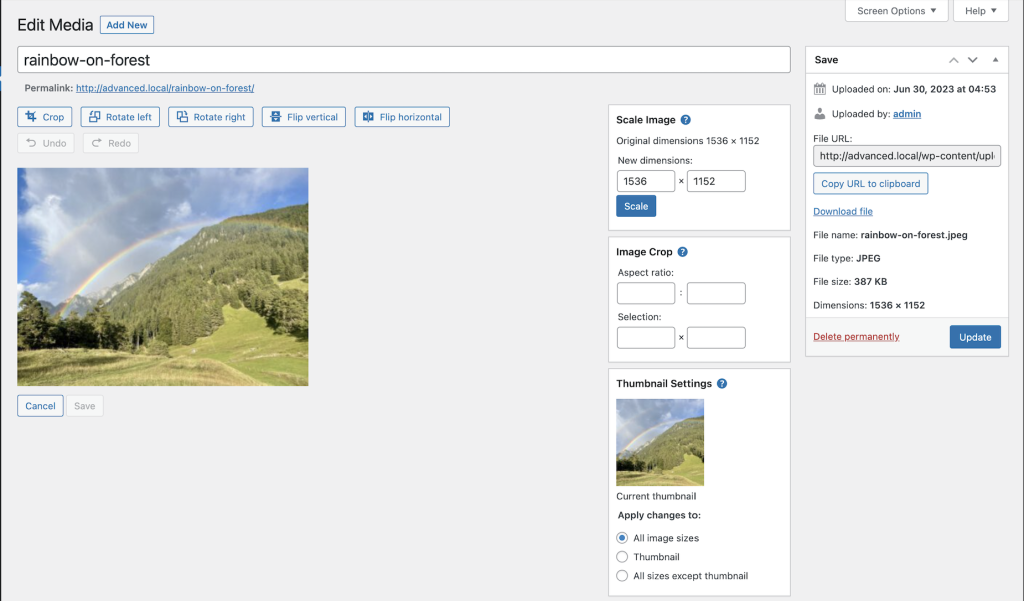
For an existing attachment, open it in the Media Library, choose Edit Image and use Scale Image. Enter the intended width, let the height follow the image's proportions, then select Scale and save any remaining edits. WordPress documents the controls in its media editing guide. Because one attachment can be reused across the site, test a separate copy when you are unsure where the original appears.
Before uploading a new image, resize a copy in your image editor. Crop only when the design needs a different shape, and check that faces, product labels or other essential details remain visible on mobile. Enlarging a small source adds pixels without recovering missing detail, so return to a higher-quality original when the image is already blurry.
Compress a copy and compare it visually
Compression reduces the data needed to store the image. Lossy compression trades some detail for a smaller file; lossless compression preserves pixel information, with the achievable reduction depending on the image and format. Use an image editor you already know or Squoosh to open a copy, compare formats and quality settings, and download the result.
Compare the original and exported file at the size visitors will see, then inspect fine text, edges and gradients more closely. Reduce quality gradually and stop when the change becomes unacceptable for the image's purpose. Record the resulting file size alongside that visual check instead of aiming for an arbitrary byte limit on every image.
Use a format suited to the content. Photographs can work well as JPEG, WebP or AVIF, while transparency and sharp graphics need their own comparison. Simply renaming a .png file to .webp does not convert it. Keep the original so you can re-export if the chosen compression damages product detail.
Confirm format support before converting the library
WordPress supports AVIF from version 6.5 when the host's image-processing software supports it. Open Tools > Site Health > Info > Media Handling and check the supported formats. The WordPress AVIF guidance explains the hosting requirement. Support for uploading a format does not automatically convert the existing library.
Upload one sample and verify that WordPress creates the sizes your site needs. Check it in the editor, on the public page and in a product gallery if relevant. If an optimisation service supplies alternative formats or a fallback, follow its documented delivery method and test that route too. Do not delete the original files until you know how restoration works.
Choose the right image version in the page builder
Edit the page and select the image. In Elementor's Image widget, review Image Resolution in the Content controls and choose an appropriate generated size instead of Full when the design does not need the original. The Image widget guide explains that setting. Changing only the visible width does not establish which file the browser downloads.
In the WordPress block editor, inspect the Image block's resolution and dimensions settings. Keep a sensible aspect ratio so space is reserved before the image loads. Background images and sliders have separate controls, so inspect the component actually supplying the reported image rather than only the Media Library attachment.
Leave the main image visible at the top of the page available promptly. Images further down can load as the visitor approaches them. Our lazy-loading guide explains how to check this without delaying the page's main content. Google's image performance guidance covers dimensions and loading priority.
Apply a proven workflow to the rest of the site
For a small library, upload the optimised copies and select them in the relevant pages. Bulk optimisation needs one maintained tool with documented backups or restoration; try a small batch on a staging copy first. Review its costs, remote-processing behaviour and format delivery before starting a large job.
After updating the page, clear the relevant caches and rerun the same performance test. Confirm the browser now receives the intended image, then inspect desktop, mobile and product zoom. If image bytes fall but the page remains slow, use our Core Web Vitals guide to identify the next measured issue rather than compressing until the pictures look poor.
Get help with the next step
If images still load slowly after resizing and compression, BugShield can help check which files the page actually serves and whether the builder or delivery settings need attention.