
Compare the slow task with a simple dashboard screen
Record the slow screen and action, such as opening Products, searching Orders or saving an Elementor page. Time it a few times and note the time of day. Compare it with opening Posts or your profile. A single slow report suggests different work from every dashboard page taking several seconds to respond.
Save your work, close duplicate editor tabs and retry in another browser with extensions disabled. Use the same account and action so the comparison is meaningful. If only one browser struggles, review its extensions and stored site data before changing the server. A delay that affects several authorised users on different devices needs a site-side investigation.
Avoid repeatedly pressing Update or submitting an order action while the first request is still running. Wait for its result and check whether it saved before trying again. Record any visible error instead of treating an uncertain response as a failed operation.
Check recent changes and the host's resource history
Compare the first reported slowdown with plugin updates, imports, backups, security scans and traffic changes. Open your host's resource or performance dashboard for that time. Look for CPU saturation, exhausted PHP workers, memory limits or slow database reports. PHP workers are the processes handling requests; a queue can delay admin even when a cached homepage loads quickly.
Give support the exact screen, action and timestamp and ask whether the request was waiting for capacity or spending time inside a plugin, database query or external service. A statement that the server is generally healthy does not explain a particular slow save. If a scheduled backup overlaps working hours, reschedule it through its own settings after confirming another backup remains available.
Our high-CPU guide covers sustained resource problems. Avoid increasing PHP memory simply because the admin is slow. Use the memory-limit guide when a recorded error actually identifies exhaustion.
Read Site Health for relevant configuration failures
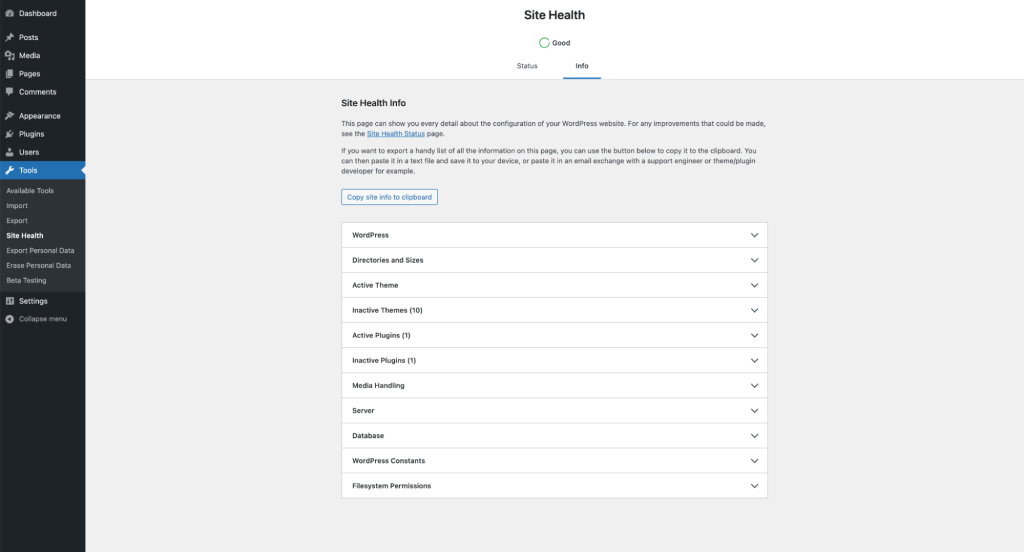
Open Tools > Site Health and read Status. Note failed scheduled tasks, requests the site cannot make to itself and blocked external connections. Expand a reported issue and follow its specific explanation. These findings are clues to compare with the slow action, not a score that must be made green by disabling checks.
The Info tab records the WordPress, PHP, theme and plugin versions needed for a support request. Share only the relevant parts privately. The Site Health reference explains those sections. A clean report does not rule out a slow plugin or an intermittent hosting bottleneck.
If your host provides request tracing, use that evidence next. Otherwise, the optional diagnostic step below can identify which component consumes time while loading an admin screen. It is for collecting a short sample, not a permanent speed setting.
Identify slow work with a temporary diagnostic tool
On a staging copy that reproduces the problem, open Plugins > Add New Plugin, search for Query Monitor by John Blackbourn, install and activate it. If only live traffic reproduces the issue, arrange a short diagnostic session with your host instead of leaving extra monitoring running indefinitely.
As an administrator, load the slow screen and open Query Monitor from the toolbar. Its Overview and Timeline describe the current page load. Review Queries by Component for time spent on database requests and HTTP API Calls for time spent contacting other services. The Query Monitor guide explains the panels. A large request count alone does not prove that a plugin is the cause; compare the time taken.
Record the component name and duration from several comparable loads. A slow save performed in the background is not necessarily captured by the initial page-load report, so ask the host to trace that separate request if needed. Keep query text, customer data and private addresses out of public screenshots. Deactivate the diagnostic plugin after collecting the evidence.
Test the component the evidence identifies
On staging, change one suspected plugin or feature at a time and repeat the exact slow action. A report showing a repeated external timeout needs its account connection or service checked. An expensive dashboard widget can be disabled through its own feature settings. Use our plugin-conflict guide to keep a record and restore changes that do not help.
Keep WooCommerce and the extensions required for the task active when testing a shop. Do not speed up the Orders screen by disabling the system that provides it. For an Elementor-only issue, preserve Elementor and Elementor Pro while comparing optional add-ons and the affected page's complexity.
If evidence points to excessive automatically loaded settings, use our autoloaded-options guide. Do not run a database cleaner or disable Heartbeat across the site on the assumption that either will improve every admin request. Each change needs a measured reason and a way back.
Verify both speed and the saved result
Repeat the original task with similar data and compare the recorded timings. Confirm the update actually saved, editor autosave still works and another administrator can use the same screen. Check an order or product workflow if it was affected. Removing a feature can make a page faster while also removing work the business needs.
Apply only the confirmed fix to the live site, then repeat the comparison during a similar workload. When the cause is hosting capacity, use the traced request and resource history to agree a suitable change with the host. A faster public PageSpeed result does not establish that a dashboard problem is repaired.
Get help with the next step
If the admin stays slow and the reports are difficult to interpret, BugShield can help trace the delayed request and separate a plugin problem from a hosting limit.