
Understand the standard roles
A role is a named set of permissions. The standard single-site roles below provide a starting point; plugins can add roles or change the permissions attached to them. Multisite networks also have a Super Admin role for network-level management.
1. Match the role to the person's work
- Administrator: site configuration, users, plugins and themes. Reserve it for people responsible for maintaining the whole site.
- Editor: manages and publishes content, including other authors' posts and pages. Suitable for someone responsible for the editorial workflow.
- Author: writes, uploads media and publishes their own posts. It does not provide general page-management access.
- Contributor: writes their own posts for review but cannot publish them or upload media under the default permissions.
- Subscriber: manages their own profile. Membership plugins can attach additional access rules to this role.
2. Add a separate account for a new colleague
Sign in with an administrator account. Do not share your own login with the colleague, because shared credentials make access harder to revoke and actions harder to trace.
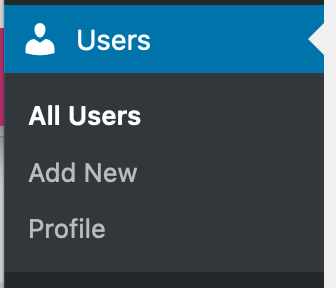
- Open Users > Add New User or Add New, depending on the WordPress version.
- Enter a unique username and the person's correct email address. Usernames are not changed through the standard profile screen later, so choose a suitable identifier now.
- Select the intended Role and leave the user notification option enabled. WordPress can then email the person their account details and password-setting link.
- Select Add New User. Ask the person to confirm they received the message and set their own password. If email fails, follow the password recovery guide rather than sending a reusable password in an ordinary message.
3. Change an existing user's role and verify it
Open Users > All Users, select the person and find the Role field. Choose the new role and select Update User. Check the account identity carefully and keep your own working administrator account unchanged while managing another person's access.
Ask the person to sign out and back in, then perform one agreed task, such as editing a specific page or submitting a post for review. Confirm that settings outside their role are unavailable. A missing menu can come from plugin restrictions as well as the WordPress role, so do not automatically promote the user to Administrator.
WooCommerce adds Customer and Shop Manager roles. Shop Manager permits broad shop and reporting work; it is not a narrowly limited packing role. Check the WooCommerce role definitions before assigning it to staff. Custom restrictions require deliberate configuration and testing.
4. Review registration and protect administrator access
In Settings > General, inspect Membership and New User Default Role. If visitors do not need public registration, leave Anyone can register disabled. When registration is needed, keep the default at the lowest suitable role, never Administrator or Editor. Shop and membership plugins can provide separate registration settings that also need review.
Enable two-factor authentication for administrators and anyone with sensitive access. Periodically compare the Users list with the people who still work on the site. Unknown administrators need investigation, not just a quiet role change.
5. Remove a former user's access without losing their content
Before deleting an account, take a backup and check its posts and plugin-owned records. In Users > All Users, select Delete for the correct person. If WordPress offers a content choice, select Attribute all content to and choose a retained author before confirming. Selecting deletion of their content is a different, destructive action.
For customer, membership or integration accounts, establish the plugin's retention requirements first. Revoke application passwords and connected service access as appropriate; changing a WordPress role does not revoke their hosting, domain or external service credentials. Keep a record of the access removed and verify the former user can no longer perform the old work.
Official reference
WordPress documents the default roles and their permissions. Use these definitions alongside the documentation for plugins that add their own access rules.
Get help with the next step
If a colleague needs one specific capability but the available role grants much more, ask BugShield for help with access. Describe the task they need to perform and the settings they should not control.