
Understand which editors this affects
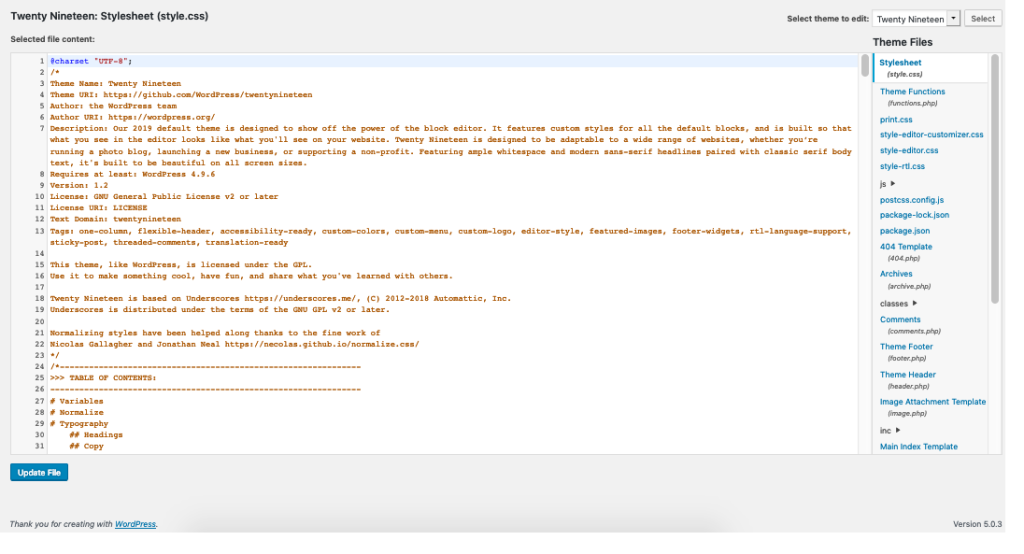
The Theme File Editor and Plugin File Editor change the PHP, CSS and other source files that run your site. A mistake there can break public pages. They are different from the block-based Site Editor, the page editor and Elementor's visual editor.
This setting does not stop file changes through hosting tools or prevent a compromised administrator from using every other administrative feature. Combine it with appropriate user roles and two-factor authentication. It is one restriction, not proof that the site is secure.
1. Check whether the file editors are already disabled
Sign in as an administrator. Look for Theme File Editor and Plugin File Editor. Their menu locations depend on the theme and WordPress version; check Appearance, Plugins and Tools. An Editor-role user cannot use these administration tools by default, so test with the correct account.
If neither is present, your host or security plugin can already be enforcing this restriction. Check its settings or ask the host before changing configuration. Do not disable an existing security feature just to make the menus appear for this test.
2. Find and save wp-config.php
Sign in to the hosting account, select the correct website and open File Manager. Find the folder containing wp-admin and wp-content, then locate wp-config.php. Some installations keep it one directory above; ask the host if its location is unclear.
Download an untouched copy to a private folder on your computer before editing. The file contains credentials, so do not leave a renamed backup such as wp-config.php.bak in the public website directory. Keep the hosting session open until verification is complete; it is your recovery route if WordPress stops loading.
3. Add or update the single setting
Use File Manager's text editor to open the file and search for DISALLOW_FILE_EDIT. If it already exists with true, leave it alone. If it has false, change that existing value to true. Do not create a second definition.
If no definition exists, add the following line above the stop-editing comment and before the statement that loads wp-settings.php. Keep the spelling, straight quotes and final semicolon exactly as shown. Add no extra opening or closing PHP tags.
define( 'DISALLOW_FILE_EDIT', true );4. Save and verify both administration and content editing
Save the file and reload the public homepage. Open a fresh dashboard page with your administrator account and confirm the two file-editor menus are gone. For a direct access check, append /wp-admin/theme-editor.php and /wp-admin/plugin-editor.php to your site address; WordPress should refuse access to those code editors.
Open a draft page and confirm its normal editor still works. If you use Elementor, open the draft there too. Review Dashboard > Updates to check that your usual update workflow remains available, without installing an update merely for this test.
If saving caused a syntax error or blank page, restore the untouched wp-config.php copy through File Manager. Do not repeatedly edit a broken live file by trial and error. The syntax-error guide explains how to identify a damaged file if the error persists.
5. Keep a record of the restriction
Note that the setting is in the site's configuration file so a future maintainer understands why the menus are unavailable. If you deliberately need to undo your own change, remove only the line you added or restore its previous value, then check access again. Arrange code changes through a tested file workflow rather than switching the dashboard editors on for everyday content work.
Official reference
WordPress documents the file-editor restriction and the separate file-modification setting.
Get help with the next step
If you are unsure which configuration file belongs to the site, ask BugShield for help with administration settings. We can help check the restriction without making unrelated changes to the editing workflow.