
Prepare the package and a test copy
Get the ZIP from the theme author's official account or WordPress theme directory. Read its WordPress and PHP requirements, installation notes and plugin dependencies. Compare requirements with Tools > Site Health > Info.
A commercial download can contain documentation, a parent theme ZIP and a child theme ZIP. The uploader needs the installable theme ZIP. If the author supplies a child theme, install its required parent first, then the child, and activate the one specified by the author. Our child-theme guide explains the relationship.
Take a complete backup and use a staging copy before changing an established site's theme. Record the current theme, homepage assignment, navigation and important templates so you can compare the new design.
Upload the installable theme ZIP
- Sign in with permission to install themes. Open Appearance > Themes > Add New Theme, then choose Upload Theme. Some versions shorten Add New Theme to Add New.
- Select the installable ZIP from your computer and click Install Now. Leave the ZIP compressed for this dashboard route.
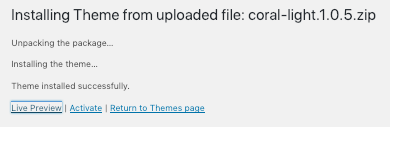
- Read the result before continuing. If the same theme is already installed and WordPress offers replacement, stop to preserve any custom files and plan that update separately.
- After successful installation on staging, choose Live Preview when offered or activate the theme there for a complete test. Keep the previous theme installed so you can switch back.
Set up the theme without importing unwanted content
Follow the author's required setup and install only the dependencies you need using the plugin installation guide. A demo importer can add pages, media, menus and settings. Read exactly what it imports and test it on staging before using it on an existing site.
Check Settings > Reading for the intended homepage and posts page. Configure navigation and templates through the theme's documented controls. Block themes use Appearance > Editor; classic themes can expose Appearance > Customize and a Menus screen.
Review the homepage, a post, an inner page, search and any shop pages at desktop and mobile widths. Test navigation, forms and checkout. Existing builder pages can depend on a page-template setting or a theme integration, so compare them individually.
Understand common upload failures
A missing style.css message means WordPress did not find a valid theme stylesheet where the package expects it. Check that you selected the installable theme ZIP rather than the outer purchase bundle or a plugin. Ask the author for the correct package if the structure is unclear.
For a missing parent-theme notice, install the parent package named by the child theme. Do not rename an unrelated theme to satisfy it. Send an upload limit or write-permission error and the ZIP size to the host, and ask for the supported upload or file-access route.
If Add New Theme is absent, the account, network or hosting configuration can restrict installations. Ask the responsible administrator. A failed activation can be recovered through the theme recovery guide.
Activate live only after the complete design passes
With a fresh live backup, install the same tested package and apply the recorded setup. Select Activate for the intended theme under Appearance > Themes. Clear relevant page caches and repeat the public-page and feature tests.
If the design fails, activate the previous theme from the Themes screen. A switch back does not remove demo-imported records or reverse every setup change; recover those changes from your recorded plan or backup with help. Keep the previous theme and backup until the replacement is verified.
Official reference
WordPress's theme management guide covers ZIP installation, preview and activation.
Get help with the next step
If the package fails to install or your existing pages do not fit the new theme, ask BugShield for help. Share the theme name and intended result so we can assess setup or recovery before changing the live design.