
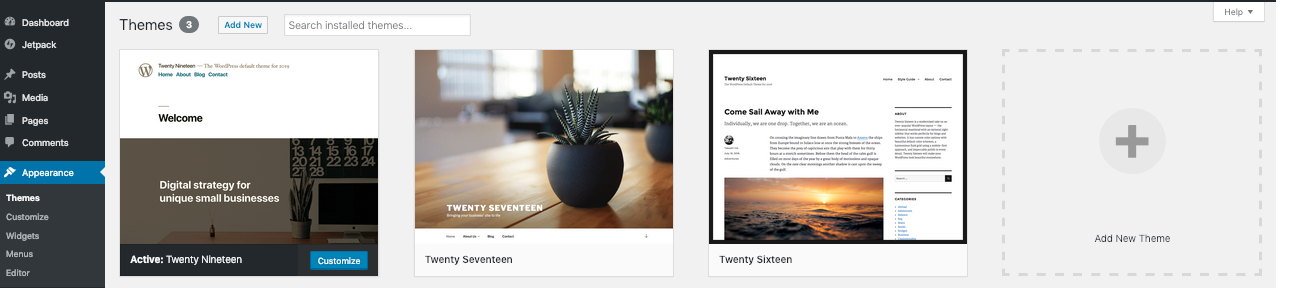
Confirm that the theme is the recovery target
Check the recovery email or host's PHP log for a theme-related error and note any recent theme edit or update. If Appearance > Themes still opens, activate a suitable installed replacement there instead of renaming files. A valid Recovery Mode session can also provide dashboard access.
Take a files-and-database backup. A theme switch changes templates, menu locations and theme-dependent features, so arrange a controlled maintenance period for a live shop. Keep a copy of custom theme files even if the installed theme is currently broken.
Identify the active folder and a usable fallback
In hosting File Manager or SFTP, open the affected site's wp-content/themes directory. Ask the host to confirm the active theme's folder if the dashboard is unavailable. A display name and folder name can differ; do not choose a folder solely because it appears first.
This folder-recovery procedure is for a standard single-site installation using a standalone theme. If the active theme is a child theme, a Multisite theme or a host-managed custom setup, have the host or developer perform the switch. Parent and child dependencies need to be handled together.
Confirm a compatible WordPress default theme from the official theme directory is installed as a fallback. If none exists, download a suitable theme's ZIP from WordPress.org, extract it on your computer and upload its complete theme folder into wp-content/themes. Check its WordPress and PHP requirements first. Keep its normal folder name and avoid an extra nested folder.
Recover the Themes screen and activate the replacement
- Record the active theme folder's exact name. Rename that folder by adding
.disabled; leave the fallback theme untouched. - Open your normal dashboard login, then visit Appearance > Themes at
/wp-admin/themes.php. WordPress can select an installed default fallback when validating a missing theme, but confirm the actual active theme on this screen rather than assuming the public page switched. - If the intended compatible replacement is not active, choose its Activate button. Open the homepage in a private window and check that the original error is gone.
- After a replacement is confirmed active, restore the broken theme folder's original name through File Manager. Keep that theme inactive while it is repaired; restoring the filename is not an instruction to reactivate it.
Stop and reverse the folder change if recovery fails
If you still cannot open the Themes screen, restore the original folder name and contact the host with the new error. Do not keep renaming themes or edit database rows from a generic SQL example. Ask support to verify the active theme values, installed fallback and any persistent cache for this exact site.
A plugin can also depend on functions supplied by the old theme. That needs coordinated recovery rather than deleting the plugin or theme. Use the conflict guide on staging once access is restored.
Restore a usable design after access returns
Check the homepage assignment under Settings > Reading, then inspect navigation, header, footer and page templates using the replacement theme's controls. Block themes use the Site Editor; classic themes can use the Customizer and Menus screens. Test forms and checkout because theme-dependent templates can affect them.
Repair the original theme on a staging copy, preserving custom edits and any required parent theme. Activate it live only after the original failing action and the design checks pass. A fallback theme restores access; it does not recreate the previous design automatically.
Official reference
WordPress documents theme installation and activation and its fallback validation behaviour.
Get help with the next step
If the site uses a customised or child theme and you cannot recover the dashboard, ask BugShield to handle the theme switch. Share the error and theme details so we can assess recovery while preserving the existing design work.