
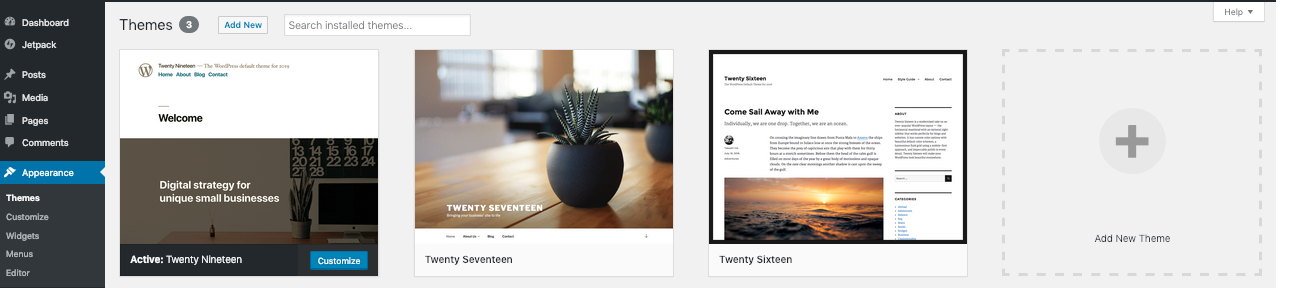
Check activation and the required parent
Open Appearance > Themes. Confirm the child theme has the Active label. If only the parent is active, the child's customisations are not being used. Before activating the child, take a backup and test the switch on a staging copy.
Read any missing-parent or broken-theme notice. Install the exact parent supplied or named by the child's author using the theme ZIP guide. Leave the parent installed even while the child is active. Do not rename an unrelated theme to imitate the missing parent.
If activation produces a critical error, use Recovery Mode or have the host restore the previous active theme. Keep the child files intact for diagnosis; an error after activation does not mean the custom work must be deleted.
Inspect the parent reference without changing PHP
When the parent is installed but WordPress still reports it missing, ask the host to inspect wp-content/themes for the correct folder structure. The child and parent should be separate theme folders, not a parent nested inside the child.
The child's style.css contains a header named Template. Its value must match the parent's actual folder name exactly, including case. This is not the parent's display title. For example, a parent folder named example-theme needs Template: example-theme in that header.
Download a private copy before any correction. Have the theme author confirm the intended value and fix an incorrect header on staging, then recheck the Themes screen. Avoid changing folder names across a live site to match a guess.
Separate missing styles from the wrong template
If the child activates but styling is absent, follow the layout guide to refresh generated files and caches. A child theme's stylesheet is not automatically loaded in every parent-theme setup; the correct loading method depends on the parent's code. Ask the author to verify it rather than pasting a generic functions.php snippet.
For one page that ignores a template change, open the page editor and inspect its assigned template. A builder template or custom page template can control the output instead of the file you expected. Record the page and template name for the developer reviewing it.
Block themes add another layer: a template customised through the Site Editor is stored in the database and takes precedence over a matching theme file. Preserve those editor changes before asking a developer to compare or clear that specific customisation on staging. Resetting all templates can remove deliberate design work.
Recover after a child-theme code edit
A parse error after editing the child theme calls for the syntax-error recovery guide. Restore the known working file rather than deleting the line reported by PHP.
The child's functions.php loads in addition to the parent's file; it does not replace it. Copying the entire parent file into the child can create duplicate functions. Have a developer isolate the intended custom change and use the parent's supported extension points.
When a parent update breaks a copied template override, compare the override with the new supported parent template on staging. Keep the custom work in a private backup. Replacing it blindly with the parent file removes those customisations instead of adapting them.
Verify the customisations and the parent features
Confirm the child is active, then open the affected page while logged out and at mobile width. Test the custom feature, navigation, forms and any shop templates. Open another page relying on the parent to confirm the correction did not remove inherited behaviour.
Apply the tested file or setting change live with a fresh backup and repeat the same checks. Record the supported parent and child versions. Keep both themes installed and maintain the parent; a child theme does not replace its updates.
Official reference
The WordPress handbook explains child-theme headers, styles and functions, plus block-template precedence.
Get help with the next step
If custom styles or templates still fail, ask BugShield to review the child theme. Share the parent and child versions and the affected page so a developer can assess the correction while preserving your design.