
Choose the next check from the evidence
When unrelated background tasks have also stopped progressing, use the Action Scheduler investigation guide. Keep renewal payment recovery tied to the existing order and provider record.
Match the subscription, renewal order and payment
This guide covers the official WooCommerce Subscriptions extension. Open WooCommerce > Subscriptions, select an affected subscription and record its number, status, payment method and scheduled dates. Find the latest renewal in Related Orders and read the notes on both records. The original purchase and a later renewal are different orders.
Locate that renewal's transaction in the connected payment provider using its reference, amount, currency and time. If money was captured, reconcile the existing renewal before taking further payment. For a pending or uncertain result, ask the provider to confirm it. Our payment-gateway guide explains the difference between a charge, an authorisation and an incomplete checkout.
Do not use Process renewal, create another renewal order or run a queued payment to see what happens on a live subscription. Those actions can charge the saved payment method. Keep notes of any manual action already taken so support can distinguish the original failure from a later attempt.
Identify which part of renewal stopped
When a renewal is due but no corresponding order exists, investigate scheduling or the subscription's state. If an order exists, use its payment result to guide the next step: a decline requires payment-method checks, while a captured payment with an unpaid order needs confirmation or processing investigated. Compare one working subscription using the same gateway to narrow the difference.
Check whether the subscription is set for automatic or manual renewal. Manual renewal expects the customer to return and pay. The official renewal-process guide explains these workflows. Deactivating the gateway plugin can change how existing subscriptions renew, so keep WooCommerce, Subscriptions and the relevant gateway active during diagnosis.
Resolve a declined or invalid payment method
Read the renewal order's gateway error and the provider's corresponding reason. For an expired card or customer action requirement, ask the customer to sign in through the shop's normal account page. Under My Account > Subscriptions, they can open the subscription and use Change payment when supported. This changes the subscription's method; adding a card to an account alone is not proof that an unpaid renewal has been settled.
Once you have confirmed that the renewal is unpaid and checked for pending retries, the customer can use Pay beside the relevant renewal order on their account or subscription view. WooCommerce documents the renewal payment journey. Have them pay the existing order rather than purchase a second subscription.
A missing or detached saved payment reference requires the gateway's supported repair process. Do not copy payment identifiers between customers or merchant accounts. Use the subscription error reference and our Stripe guide when the log identifies a connection or saved-method problem.
Check the retry already scheduled for this order
On the latest renewal order, inspect Automatic Failed Payment Retries and the order notes. Check whether a retry is pending and when it is due before coordinating another payment attempt. A retry date on the subscription alone does not establish that the retry is still pending or that the system is stuck.
The retry setting is under WooCommerce > Settings > Subscriptions, in Payment recovery on the current interface. Read the failed-payment retry documentation before enabling or changing the policy. Retry eligibility depends on the gateway and failure; enabling it does not repair an invalid account connection.
If the payment record, retry record and subscription dates disagree, stop manual intervention and have the integration reviewed. Avoid deleting retry actions or changing dates solely to make an overdue label disappear. The unpaid billing period still needs a deliberate resolution.
Inspect scheduled actions without running the queue
Open WooCommerce > Status > Scheduled Actions and search for the subscription number. Look at the action's name, arguments, scheduled time, status and log. A Pending action dated in the future is normal. An overdue action or a recorded failure needs investigation, but neither proves that no charge occurred.
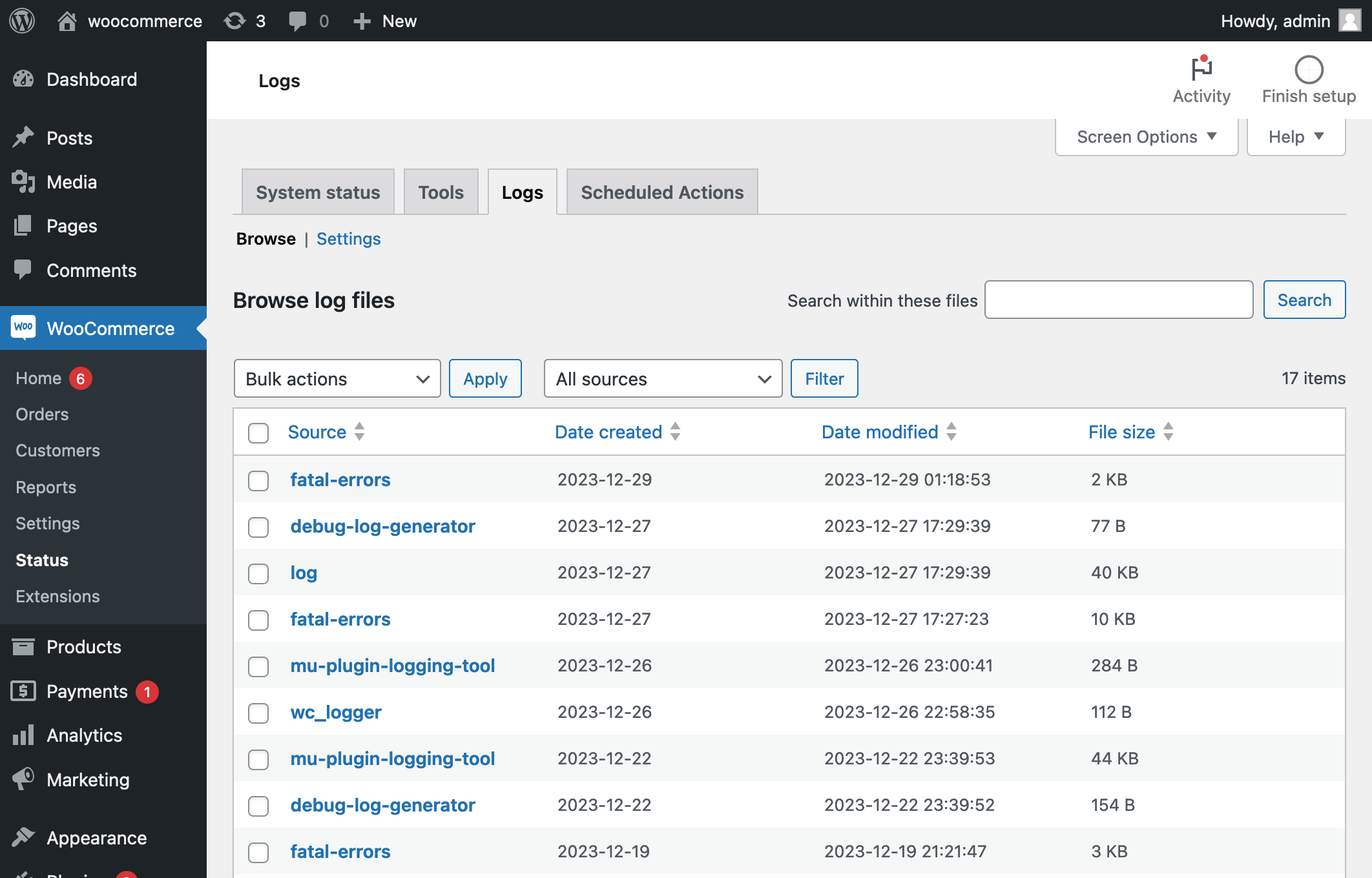
Compare the action with the related renewal and provider record. Save the error and timing for your host or developer. Check WooCommerce > Status > Logs for the corresponding gateway, fatal-error or failed-action entries. Use the scheduled-events reference when support needs to trace the underlying scheduler.
Ask the host to verify the existing WordPress scheduling setup and any server task that runs it. A site can intentionally disable visit-triggered scheduling because the host runs it another way. Do not add a second scheduler, bulk-run overdue jobs or clear failed actions before the cause and already-processed payments are understood.
Test the repair with a new test subscription
Create a protected staging copy with outgoing customer emails disabled and every payment integration using its test environment. Preserve Subscriptions' staging protection for copied live subscriptions. Its staging documentation explains duplicate-payment prevention. Do not globally enable automatic payments on a clone containing live saved methods.
Staging mode forces manual renewal, including for newly created test subscriptions, so Process renewal there does not by itself test automatic charging. For that test, use a separate test-only WordPress installation containing no copied live subscriptions or payment methods, with the gateway connected only to its test environment. Alternatively, ask the gateway provider or developer to configure selective testing on the clone using the supported staging procedure.
Follow the official renewal test procedure with a new test subscription. Where the gateway supports it and automatic test billing is confirmed, Process renewal exercises its renewal. Verify one test payment, its matching order, the subscription's resulting status and correct next billing date. A successful initial checkout alone does not test recurring billing.
To verify notifications, arrange for test mail to reach only an inbox you control; with all mail suppressed, receipt cannot be tested. Our order email guide explains the delivery checks. Apply the confirmed fix to live without overwriting new orders, then monitor the next authorised renewal and review earlier affected billing periods individually.
Get help with the next step
If a live renewal is overdue or its payment state is unclear, BugShield can help trace the subscription and payment records before a retry risks charging the customer again.