
Check the payment before retrying checkout
Open WooCommerce > Orders and select the order. Read Order notes and record its payment reference, amount, currency and time. Open the matching payment in the Stripe account connected to this shop. A successful captured payment needs the existing order reconciled; do not ask the customer to pay it again.
An authorisation reserves funds and still requires capture when the gateway is configured for that workflow. A failed payment needs its decline or error reason read. If Stripe requests authentication, the customer must complete their bank's approval process. Do not bypass that requirement or ask for card details by email. Our payment-gateway guide explains how to compare the two records when their statuses disagree.
Confirm which Stripe integration you use
Check Plugins > Installed Plugins for the exact plugin name and author. The following connection steps apply to the official WooCommerce Stripe extension. WooPayments and other Stripe plugins have their own settings and support procedures. Do not install another Stripe gateway over an existing one as a troubleshooting shortcut.
For the official extension, open WooCommerce > Settings > Payments > Stripe > Settings. Under Account details, select Configure connection. Check that the connected account is the intended merchant account and review its live connection. A public checkout must use live mode; a staging copy must use a separate test connection. Follow the extension's connection instructions if the account is disconnected.
Also read the notices in your Stripe dashboard. An account restriction or missing verification needs resolving with Stripe. Reconnecting repeatedly will not remove an account restriction, and connecting a different account can leave saved customer payment methods unusable.
Use the error log to choose the next action
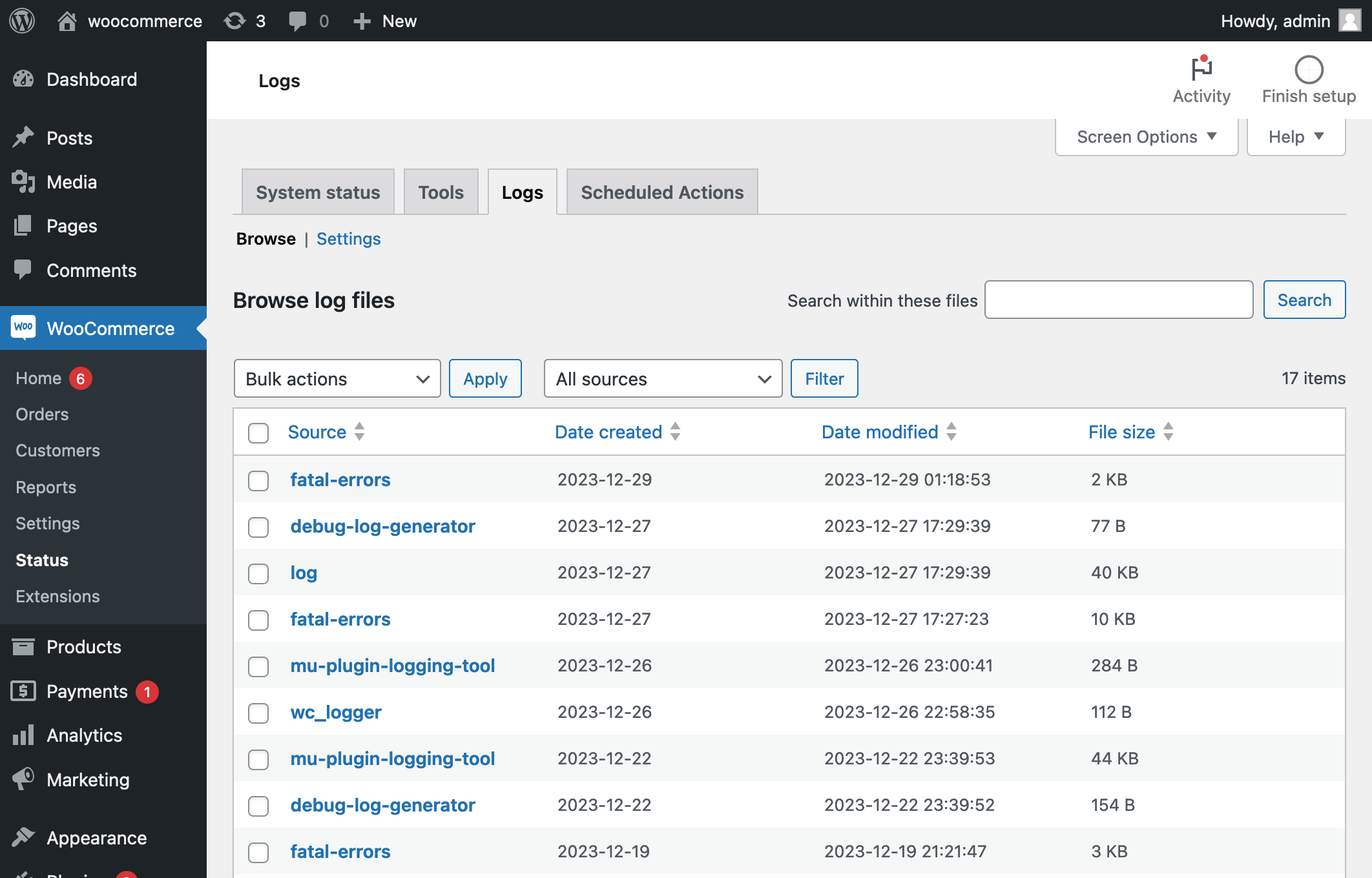
In the extension's Settings tab, expand Advanced settings, enable Log error messages and save. Reproduce the problem once on a protected test copy using test payments, noting the time. Go to WooCommerce > Status > Logs, select the Stripe source for that date and open its entries. Search for the test order number or time. The official Stripe troubleshooting guide describes the available diagnostic information.
Read the actual error rather than treating every failure as invalid keys. A decline belongs with the payment reason; an account or permission error belongs with the connection. A connection timeout leaves the payment outcome uncertain until Stripe's record is checked. Keep a short redacted error excerpt for support and turn diagnostic logging off after the investigation unless support requests otherwise.
Repair payment notifications when the charge succeeded
Stripe sends payment updates back to the shop using webhooks, which are automatic notification messages. In Stripe > Settings > Account details > Configure connection, inspect the webhook status on the relevant Live or Test tab. Current versions configure these during connection. If they are missing, use Reconfigure webhooks for that environment following the official webhook instructions.
The official extension uses your shop's address followed by /?wc-api=wc_stripe. Do not copy an endpoint for a different plugin or delete unfamiliar endpoints from Stripe: other services can own them. Where delivery fails, give your host the affected endpoint and delivery time so they can inspect redirects, password protection or a blocked request. Any exception should be limited to the verified payment notification route.
A Configured label does not replace checking the affected order. After repairing the connection, ask gateway support how to reconcile an already-paid order if it still has the wrong status. Avoid manually marking a group of orders paid without confirming each transaction.
Investigate missing fields or failed bank approval
If the card field or bank approval window never appears, compare the checkout in another browser without extensions. Check for an HTTPS warning, then follow our checkout troubleshooting guide. A delayed payment script or unsupported checkout customisation needs a display or compatibility fix, not a new secret key.
Use a protected staging copy for plugin tests. Keep WooCommerce, Stripe and any required product or subscription extension active. Test one optimisation or checkout extension at a time and restore changes that do not affect the result. Preserve the original failure details for the relevant plugin provider.
Confirm the repair with a complete test purchase
On staging, connect the Test tab to a Stripe test account, enable test mode and save. Follow WooCommerce's Stripe testing procedure, using its linked test card details. Test both a successful payment and the authentication flow that failed. Keep customer emails disabled on the copy.
Confirm one test payment matches one order, with the correct total, currency and order status. Check the confirmation page and order notes too. Apply only the confirmed fix to the live site, verify its live account and mode separately, and reconcile any authorised live test purchase before refunding it. Test mode success alone does not prove the live account is ready to accept payments.
Get help with the next step
If Stripe shows a payment but your shop cannot confirm the order, BugShield can help trace the failed step. Share the plugin name, order reference and redacted error so the investigation starts with evidence.