
Find out whether the payment completed
Select the affected order under WooCommerce > Orders and read its Order notes. Use the transaction reference to find the payment in your PayPal business account. Compare the amount, currency and time as well. Record whether PayPal reports a completed payment, a pending payment, an authorisation or a failure.
A customer returning from PayPal does not by itself prove that funds were captured. If the merchant record confirms capture, investigate the existing order instead of requesting another payment. An authorisation is a hold that requires the configured capture step. For an uncertain or pending result, ask PayPal to confirm its state before retrying or shipping. Our gateway troubleshooting guide explains this reconciliation process.
Identify the plugin and check its account
Under Plugins > Installed Plugins, confirm that you use WooCommerce PayPal Payments. PayPal Standard, Braintree and third-party PayPal gateways have different setup instructions. Record the plugin version before changing anything, especially on a subscription shop where an older integration can still service existing agreements.
Open WooCommerce > Settings > Payments and manage PayPal. In the current PayPal Payments interface, its Settings page shows Connection Status. Confirm the merchant account belongs to this shop and that the live shop is not labelled Sandbox. Review PayPal's account notices for unresolved verification or receiving restrictions. The official settings guide shows this interface; older releases use a different layout.
Reconnect through the plugin's onboarding flow only when the connection or error points to an account problem. Use the same intended merchant account and complete every requested approval. If PayPal says the account needs verification, resolve that with PayPal rather than repeatedly replacing credentials.
Separate a missing button from a rejected payment
For a missing payment option, check that PayPal is enabled on the plugin's Payment Methods page. Review its Styling settings for the intended button location, such as the product page or classic checkout. Availability also depends on the selected method and region, so a missing regional wallet does not establish that PayPal itself is broken.
Try the same product and address in another browser without extensions. If PayPal works there, compare browser blocking or consent behaviour. If all shoppers lose the button after a layout change, inspect the checkout format and builder compatibility using our checkout guide. Keep Cart and Checkout on matching block or classic formats when testing an alternative layout.
Use a protected staging copy to test script delay and other checkout customisations one at a time. Leave WooCommerce, PayPal Payments and required product extensions active. Restore settings that do not change the result. A missing button needs its loading or configuration problem traced before testing a charge.
Read the error behind the checkout message
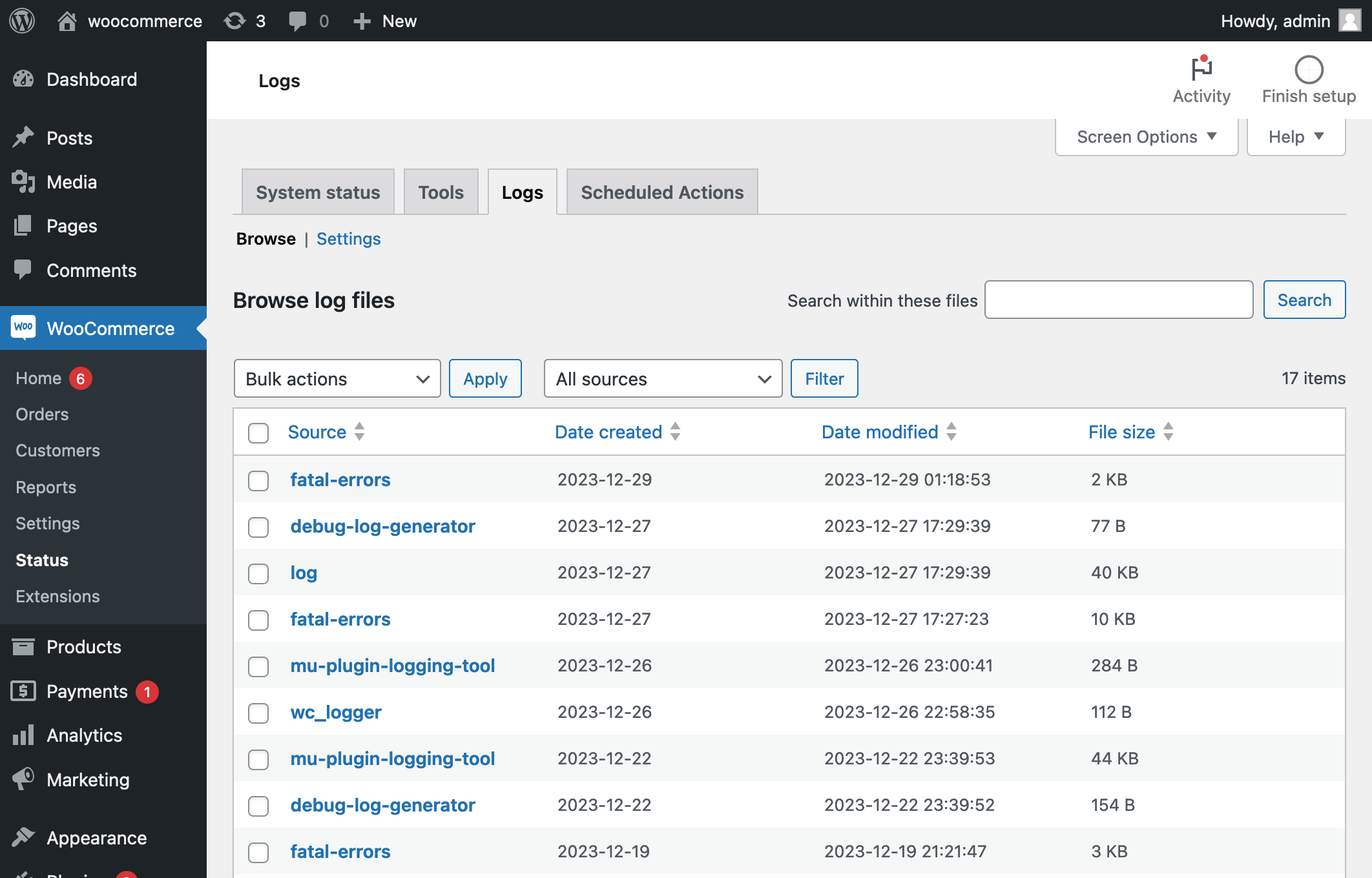
In the current plugin interface, enable Logging under Settings > Expert Settings > Troubleshooting and save. Reproduce one failure with sandbox payments on staging and note the time. Open WooCommerce > Status > Logs, choose the PayPal Payments source and relevant date, then read the entries around that attempt. Keep a redacted error code or debug reference for support, not a full public log.
A generic checkout failure has several possible causes. Follow the specific account, currency or request error in the log and compare it with the PayPal Payments troubleshooting reference. Disable temporary diagnostic logging when finished unless support asks you to retain it.
For DUPLICATE_INVOICE_ID, first check whether the invoice was already paid. A restored shop or two shops sharing an account can reuse invoice identifiers. Give each shop a distinct invoice prefix in the plugin's Common Settings after reconciling existing records. Do not disable PayPal's duplicate-payment protection or alter an already-paid order to force another charge.
Check notifications when PayPal was paid
PayPal sends status updates to the shop through webhooks, which are automatic notification messages. In the current PayPal Payments interface, inspect the Webhooks controls under Expert Settings. Older interfaces expose these controls on the Connection tab, as shown in the legacy documentation. Follow the instructions for the installed version rather than creating a guessed callback address.
A simulation result is only one diagnostic check. Confirm an actual sandbox order receives its expected payment update. If notification delivery is blocked, ask your host to inspect the precise route and time for password protection, redirects or firewall rejection. Preserve protection elsewhere and avoid a blanket firewall bypass.
Verify the complete purchase after the fix
Use PayPal's sandbox buyer and merchant accounts on staging, following the account setup and sandbox instructions. Complete the same checkout journey that failed, including the return to the shop. Confirm one sandbox transaction, one matching order, the correct amount and expected status. Keep real customer emails disabled on the copy.
Apply the proven setting or plugin fix to the live shop and confirm its live merchant connection separately. If you authorise a real test purchase, reconcile it before refunding through the supported gateway workflow. Existing affected orders still need individual review; a new successful order does not establish that earlier customers were charged correctly.
Get help with the next step
If the error leaves you unsure whether a customer has paid, BugShield can help investigate the PayPal connection and the matching order before another payment is attempted.