
Choose the next check from the evidence
If a payment exists but orders disappeared after an order-storage change, use the HPOS missing-order checks before retrying payment or restoring data.
Match the order to the provider's payment record
Open WooCommerce > Orders, select the affected order and read Order notes. Record its number, total, currency, time and transaction reference. Sign in directly to your payment provider and find the corresponding transaction. Use the reference where available; matching an amount alone is not enough when several customers have placed similar orders.
A captured or successful payment needs reconciliation with the existing order, not another payment attempt. An authorisation reserves money but is not the same as capture. Pending can mean the provider is still processing. Follow its stated status and capture workflow before fulfilling goods, retrying or refunding. If you cannot confidently match the records, ask gateway support to confirm the payment state.
If the provider shows a decline, read its reason. A request for customer authentication needs the customer to complete their bank's approval step. A missing or invalid account connection requires work on the shop. Keep card details out of messages and never ask a customer to send their full card number or security code.
Identify the exact gateway and the scope of the failure
Under Plugins > Installed Plugins, note the gateway's full name, author and version. WooPayments and the WooCommerce Stripe extension are different integrations even though both involve Stripe infrastructure. Instructions and connection screens from one do not automatically apply to the other.
Compare the failing order with a recent successful one. Does the problem affect one method, currency, product type or customer? If every payment method is absent, check WooCommerce > Settings > Payments for disabled methods and setup notices. If checkout itself is blank or unresponsive, use our checkout guide before changing payment credentials.
Read a dated gateway log
Open your gateway's settings from WooCommerce > Settings > Payments and look for its documented logging or debug-log option. The label and location depend on the plugin. Enable logging temporarily if it is available, save, and note the time of one controlled test on a protected staging copy. Logging is not a reason to retry an uncertain live charge.
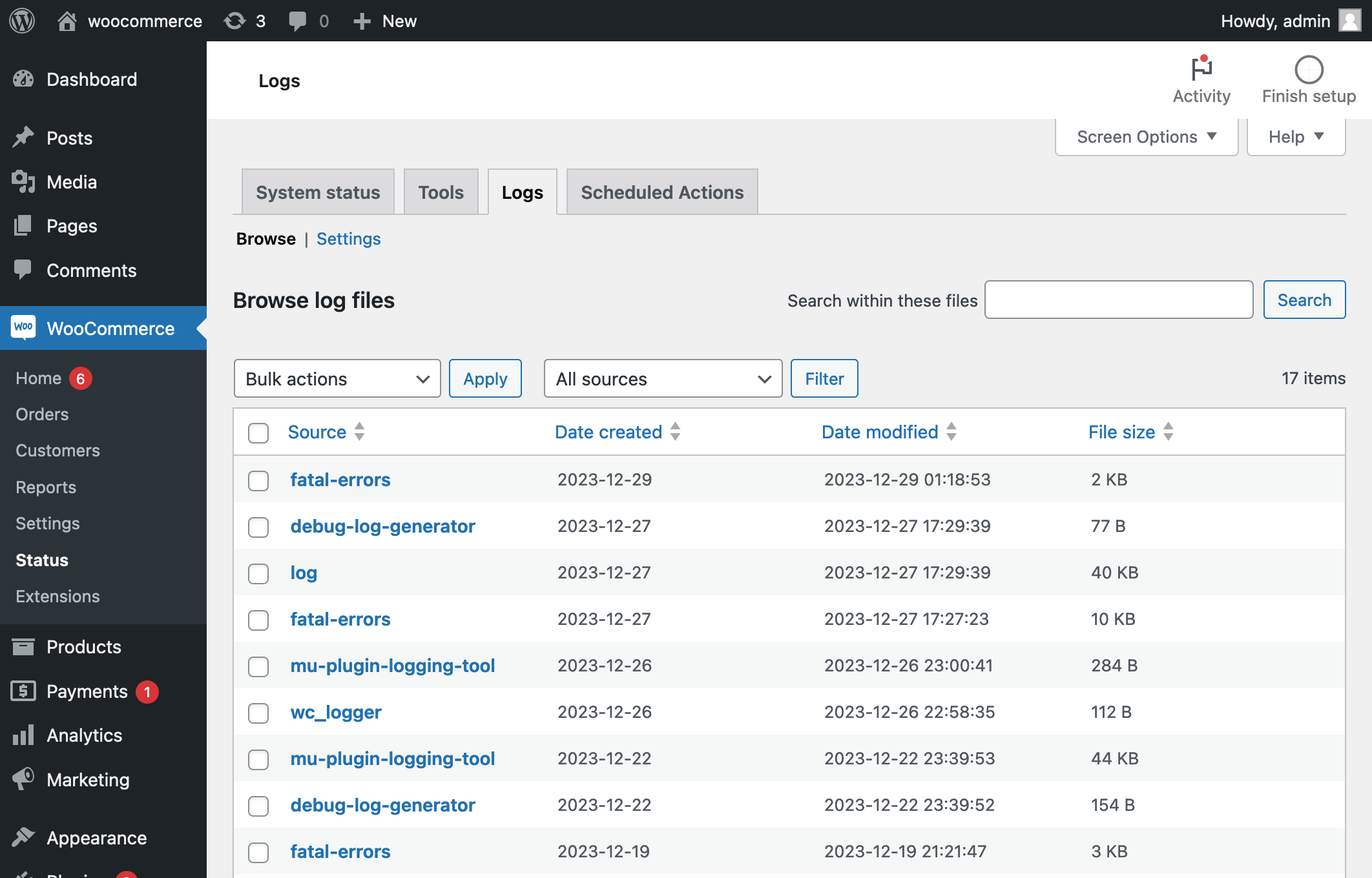
Go to WooCommerce > Status > Logs. Choose the gateway source and relevant date, then view the file or entries around that time. If no gateway source appears, check that logging was saved and the test actually reached the gateway. A fatal-errors source can reveal a server failure before payment was contacted. WooCommerce describes the viewer in its log-finding instructions.
An invalid-credentials message points to the account connection. A timeout means the response was not received in time, so check the provider before retrying. Permission or blocked-request errors need the gateway and host to inspect the relevant request. Save a short redacted excerpt for support, then disable diagnostic logging when finished unless the provider instructs otherwise.
Repair the connection that the evidence identifies
Check the connected merchant account and live/test mode in the gateway settings. The public shop needs its intended live account. Use the plugin's Connect or Reconnect workflow only when its status or logs identify a connection problem. Reconnecting to a different merchant account can disrupt access to saved payment methods, so confirm the existing account first.
Review provider notices about verification, account restrictions and the specific payment method. Compare the order currency with those supported by that integration and account. A payout delay alone does not establish that taking payments is blocked. Use our Stripe guide or PayPal guide for their connection checks.
When money arrives but the WooCommerce order does not update, inspect payment notifications. A webhook is a message the provider sends back to the shop. Follow the installed gateway's instructions to check its connection or delivery status. WooCommerce's general Advanced > Webhooks screen creates outgoing store notifications; it is not a universal place to repair incoming payment confirmations.
Test display or plugin conflicts without taking real payments
Use a protected staging copy with customer emails disabled and the gateway connected to its documented test environment. Keep WooCommerce, the affected gateway and required product extensions active. Change one checkout customisation or optimisation setting at a time, then repeat the same test purchase. Restore changes that make no difference.
If payment fields fail to load, check HTTPS warnings and block/classic checkout compatibility before switching gateways. A browser test with extensions disabled helps identify a device-specific problem. Give the provider exact reproduction steps if its fields fail with the supported standard checkout. Do not disable the whole firewall or publish payment keys to make a test work.
Verify the payment and order together
A passing test ends with one payment and its matching order, the expected order status and a confirmation page. Confirm the charged total and currency, then check that the order notes contain the expected payment reference. Test the original failing product type as well as a simple purchase.
After applying the confirmed fix to the live shop, verify its live connection separately. If a real test purchase is needed, authorise one purchase, reconcile it and use the provider-supported refund workflow. Review previously affected orders individually; do not bulk-mark them paid based on a successful new test.
Get help with the next step
If the payment and order records disagree, BugShield can help investigate the integration. Keep the relevant order reference and a redacted error message ready; secret keys and card details are not needed for an initial description.