
Confirm which timeout occurred
Find the exact message in the hosting PHP log or recovery email. Maximum execution time of ... seconds exceeded identifies a PHP limit. A browser timeout or a 504/524 response can instead come from another server waiting for a response. Send the message and test time to your host so they can identify the layer that stopped the request.
Record the action: a backup, product import, editor save or ordinary page view. Check whether the job is still running or has already written records before starting it again. If a payment was involved, inspect the order and gateway records first using the payment-error guide.
Preserve data and try a smaller supported workload
Take a backup through hosting if the dashboard backup process is the one failing. For an import or bulk edit, use a staging copy and test a small sample. Select a smaller batch size if the tool documents that control.
Use the tool's resume function or duplicate-matching rules after a partial import. Do not split a CSV blindly if its rows depend on one another, such as variable products and their variations. For a backup, ask the backup provider whether its supported process can divide the work or run through hosting instead.
If a normal page started timing out after one plugin change, use the plugin conflict guide. A larger time allowance is not a substitute for correcting a loop or a failed external-service request.
Check and change the PHP time allowance when justified
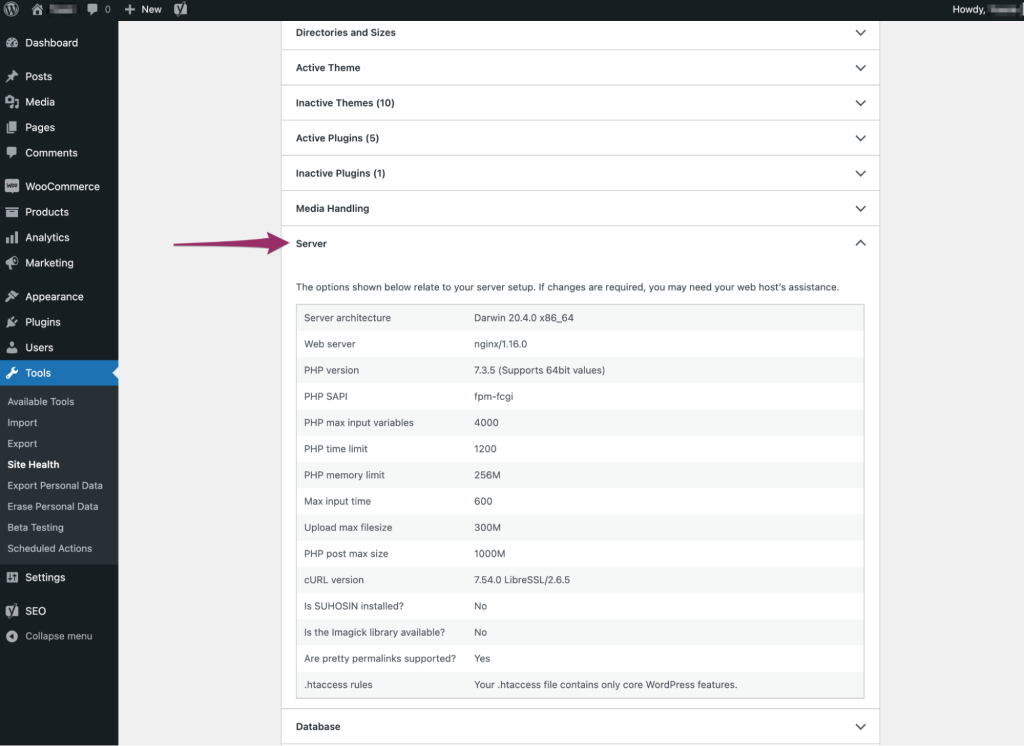
Open Tools > Site Health > Info > Server and record PHP time limit if displayed. Ask your host to confirm the effective value for the failing web request and any separate server or proxy timeout. The plugin's documentation should explain its requirement; use that and the host's supported limits to choose a value.
- In hosting, select the affected website and open its PHP settings. cPanel accounts that expose it use Software > MultiPHP INI Editor; choose the domain in Basic Mode.
- Find
max_execution_timeand record the current number of seconds. Use a bounded value agreed with the host for the specific job, then save or apply the change. Do not select 0, which removes this PHP limit. - Reload Site Health or ask support to verify that the new value applies to this domain. If the setting is unavailable or unchanged, let the host make the supported change instead of adding directives to random files.
- Run one controlled test and inspect its completion record. A larger PHP limit will not override an earlier timeout imposed by another server.
Investigate repeated failure instead of extending again
If the task still stops, give the host and plugin maintainer the job type, sample size, failure time and error. Ask whether the operation is waiting on an external service, blocked by a server limit or repeatedly processing the same data. Use private debug logging if they need WordPress-level evidence.
Avoid adding php_value lines to .htaccess without the host's instructions. Their validity depends on how PHP is run and unsupported directives can produce a 500 error.
Verify the result and restore temporary settings
Check the output, not just the disappearance of the error. Count imported records, inspect representative items or confirm the backup can be opened and contains the expected files and database. Check for duplicates created before the earlier failure.
Return a temporarily raised allowance to its recorded value once a one-off task is complete, unless the host confirms an ongoing requirement. Turn off diagnostic logging, then test the dashboard and a public page. Document the batch size or corrected plugin version that completed the job.
Reference material
PHP documents execution-time limits and other server timeouts. cPanel describes its MultiPHP INI Editor controls.
Get help with the next step
If a routine task keeps timing out or a partial import needs untangling, ask BugShield to assess the problem. Tell us what ran and what completed so we can plan the next step without duplicating work.