
Record the complete Site Health result
Open Tools > Site Health > Status and expand the relevant warning. Note the time, error code, response status and which test failed. The WordPress loopback test and page-cache test are distinct checks. A cache test that cannot complete leaves caching undetermined.
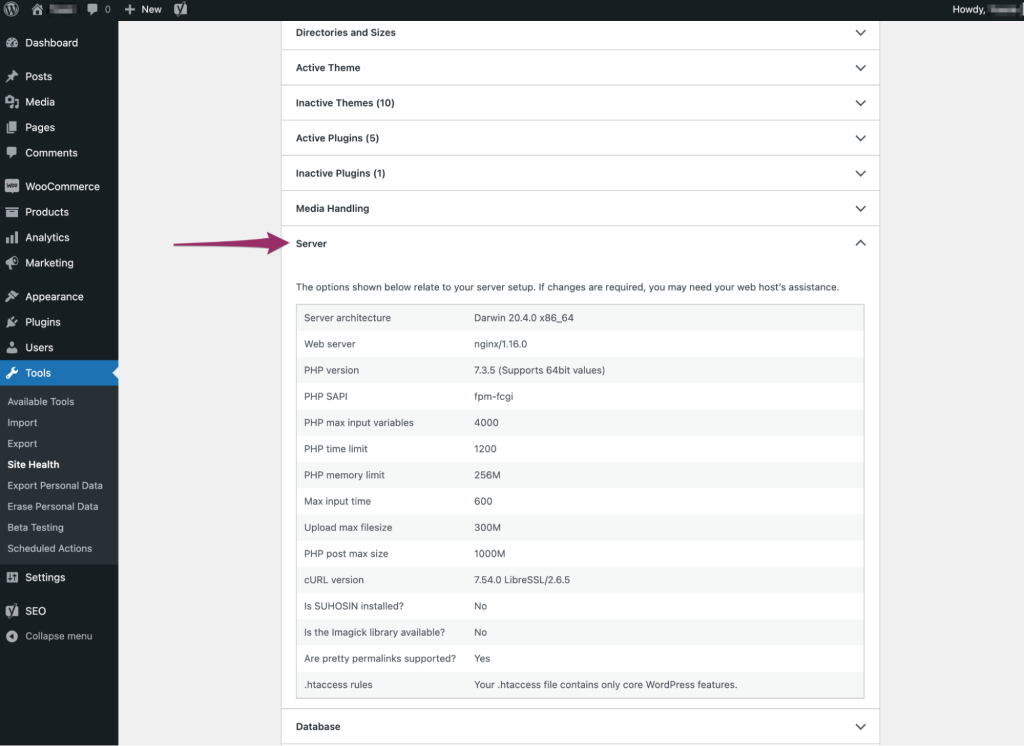
Under Tools > Site Health > Info, record the WordPress and PHP versions and relevant server information. Share only the fields support needs after removing private paths or configuration. Avoid changing the site address merely to make it resemble a screenshot.
Use the response to choose the next check
A 401 or a login page points towards authentication or access restrictions. A 403 points towards a refusal that needs matching host or firewall evidence. A timeout such as cURL error 28 means the request did not finish in the allotted time; it does not identify one universal cause.
Ask the host to reproduce the request from the website’s runtime, including its hostname and expected route. Have them compare name resolution, redirects, certificate handling and the relevant logs. A successful request from your laptop exercises a different network path and does not resolve the server-side question.
Check restrictions without removing protection everywhere
Password-protected staging, a hosting firewall or a security plugin can affect requests back to the site. Confirm which layer handled the failing request and whether the intended credentials or access policy reached it. Make one scoped change through the responsible administrator, then repeat the same test.
Do not disable certificate verification, remove all firewall rules or expose a staging copy to the public as a permanent fix. If a plugin interaction is suspected, reproduce it on a protected copy with a recovery route before testing changes that affect the live site.
Verify the self-request and the affected feature
After the targeted correction, reload Site Health and save the new result with the change time. Test the feature that led you here, such as a scheduled publication or a background task. A successful loopback test alone does not establish that every scheduled job ran.
Use the missed scheduled posts guide for publication faults and the Action Scheduler guide for store queues. If the request now succeeds but caching still needs attention, continue with the cache guide and the host’s cache configuration.
Send the host a focused evidence record
Provide the exact warning, timestamps and time zone, relevant response code, recent changes and what the browser does differently. Ask which server-side request failed and which layer answered it. This gives support a specific investigation without exposing the full site configuration or asking them to guess from a generic screenshot.
Get help with the next step
If the evidence is unclear, get a one-off wordpress support quote. Share the symptom and checks already completed so the next step can be agreed.