What the WooPayments security update covers
WooPayments includes subscription features inside the plugin, so a store can take recurring payments without installing a separate extension. According to the November advisory, the update addresses a security issue in that bundled subscriptions functionality and extends a fix WooCommerce announced in August.
The August fix belonged to the standalone WooCommerce Subscriptions extension. Version 9.1.0 of that extension closed several vulnerabilities, and WooCommerce described the most serious as one where an unauthorised user could assume control of a site. The company also stated it had no evidence that any store was compromised or that customer data was accessed.
Treat the August description as background, not as a severity rating for the WooPayments issue. Your practical job is the same either way: find the version your store runs and match it to the fixed release for its line.
Check your WooPayments version
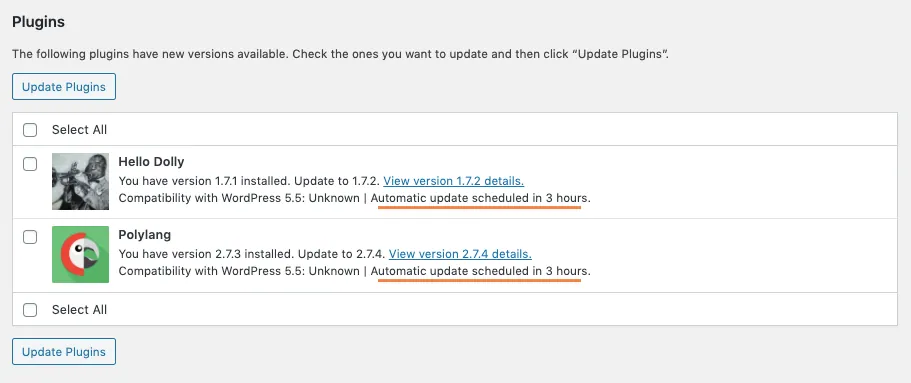
The check happens on the normal plugins screen in WP Admin. Before updating a live shop, take a fresh backup so you have a known restore point, following the same routine you would use to update WordPress plugins safely.
If your store already runs a fixed version, WooCommerce confirms you do not need to repeat the update.
- In WP Admin, go to Plugins > Installed Plugins and find WooPayments.
- Note the installed version shown in the WooPayments row.
- Compare that number with the fixed version for your release line in the list below.
- If your store needs the update and one is available, select Update now.
- When the update finishes, reload Plugins > Installed Plugins and confirm the version now matches a fixed release.
WooPayments fixed versions by release line
Find the entry that contains your installed version. Where two versions are grouped, such as 11.0.0 or 11.0.1, both share the same fixed release.
Stores on anything older than 9.0.0 have no patch on their own line and need 11.2.1. A jump that size crosses many releases, so test it on a staging copy first if you have one, and check checkout once the live update is done. If your installed version does not appear anywhere in this list, ask WooCommerce Support to confirm whether it already includes the fix.
- Release 11: 11.2.0 needs 11.2.1, 11.1.0 needs 11.1.1, and 11.0.0 or 11.0.1 needs 11.0.2.
- Upper 10.x versions: 10.9.0 needs 10.9.1, 10.8.0 needs 10.8.1, 10.7.0 or 10.7.1 needs 10.7.2, 10.6.0 needs 10.6.1, and 10.5.0 or 10.5.1 needs 10.5.2.
- Lower 10.x versions: 10.4.0 needs 10.4.1, 10.3.0 or 10.3.1 needs 10.3.2, 10.2.0 needs 10.2.1, 10.1.0 or 10.1.1 needs 10.1.2, and 10.0.0 needs 10.0.1.
- Upper 9.x versions: 9.9.0 needs 9.9.1, 9.8.0 needs 9.8.1, 9.7.0 needs 9.7.1, 9.6.0 needs 9.6.1, and 9.5.0 needs 9.5.1.
- Lower 9.x versions: 9.4.0 needs 9.4.1, 9.3.0 needs 9.3.1, 9.2.0 or 9.2.1 needs 9.2.2, 9.1.0 needs 9.1.1, and 9.0.0 needs 9.0.1.
- Anything older than 9.0.0 needs 11.2.1.
Automatic updates still need a version check
WooCommerce asks owners to check the installed version even when automatic updates are enabled or a host manages updates for them. Plugins > Installed Plugins shows the version actually installed right now, and that number is the one to compare with the list above.
When a hosting company or another developer looks after your store, ask them for the installed WooPayments version number rather than a general assurance that updates are handled. A specific number gives you something to compare with the list above, and a vague reply gives you nothing to check.
Agencies: check every site, including staging copies
For anyone managing several stores, WooCommerce is explicit that a completed update on one site does not confirm the status of another. Verify each site individually, and include staging and development copies that the public can reach.
Forgotten test copies deserve particular attention. A staging site cloned months ago still carries whatever WooPayments version existed on the day it was copied, and because nobody logs in, it sits outside the routine applied to the live shop. Update it, or remove it if it is no longer in use. When you rebuild test copies later, protect the copy from public access as part of setting it up.
Keep a simple record for each site: the version you found, the version after updating and the date you checked. WooCommerce recommends this so you can follow up on any site that still needs attention, and the same record answers client questions quickly.
When the update is missing or fails
If Update now does not appear, or the update stops with an error, contact WooCommerce Support. Include your installed WooPayments version and the exact error message shown, because the support team uses both to find the appropriate next step for your store.
Add the failed attempt to your site record as well, with the time and message. Once support has helped you through, repeat the version check from the start so the record ends with a confirmed fixed release rather than an assumption.
What a matching version number proves
A fixed release on the plugins screen confirms the patched code is installed. What the version number cannot show is whether anyone used the issue before you updated, so a store that looks normal does not settle that question on its own.
If you have a specific reason for concern, the August advisory listed the checks WooCommerce recommended for a suspected compromise: audit logs and files, review admin accounts for unauthorised users, remove suspicious files, reset passwords and rotate API keys. Those steps were written for the Subscriptions extension, yet they make a sensible starting point for any worried store owner.
Finish with a working check. Place a test order, confirm the payment appears in WooPayments and, if you sell subscriptions, make sure new sign-ups behave as expected. Should checkout break after the update, our page on WooCommerce checkout not working explains how a fixed-price investigation traces and repairs the fault.
Sources
WooPayments security update FAQs
Do I need the WooPayments security update if I do not sell subscriptions?
Yes, check anyway. The issue sits in subscriptions functionality bundled inside WooPayments, and WooCommerce asks anyone managing a store that uses WooPayments to compare the installed version with the fixed releases and update where needed.
My store has automatic updates turned on. Do I still need to check?
Yes. WooCommerce specifically asks owners to confirm the installed version under Plugins > Installed Plugins even when automatic updates are enabled or a host manages updates.
Which version should I install if my store runs WooPayments 8.x?
Any store on a version older than 9.0.0 needs 11.2.1. Take a backup first, test on a staging copy if you have one, then confirm the new version and place a test order.
Is this the same as the August WooCommerce Subscriptions update?
No. The August update fixed the standalone WooCommerce Subscriptions extension in version 9.1.0. The November update extends that fix to the subscriptions code bundled in WooPayments. If your store runs both plugins, check both versions.
Do staging and development sites need updating too?
Yes, if the public can reach them. WooCommerce asks agencies and developers to verify every site they manage, including publicly accessible staging and development copies, because an update on one site does not confirm another.