Why WooCommerce security updates have become more frequent
On 6th November 2026, WooCommerce explained the run of core patches, extension fixes and a PHP advisory that store owners have seen since the summer. AI tools have made vulnerabilities far easier to find, and reports about Woo products through Automattic's HackerOne programme rose roughly nine times over the past year. WooCommerce has also been scanning its own code, and says those scans have found more than twice as many valid core issues as outside reports.
WordPress itself faces the same pressure. In August its security team launched a Core Security Initiative, including a more automated security release process and scheduled security releases. For you, the practical result is a steadier stream of updates across WordPress, WooCommerce and extensions.
Most of the valid core issues WooCommerce has tracked since July are not emergencies. By its count, about three quarters are Medium or Low severity, meaning they need specific conditions to exploit or have minor impact. Those fixes still need installing, and WooCommerce has changed how fixes of each severity reach your store.
Security fixes now arrive in dedicated patch releases
Until recently, most security fixes travelled inside regular feature releases. When a feature release carried an unrelated bug, rolling it back also removed the security fixes, even though those vulnerabilities had already been disclosed publicly. WooCommerce now gives security fixes their own releases by default. Critical and High severity fixes ship in the next patch release on the current version, while Medium and Low severity fixes ship in the patch release after the next minor version.
WooCommerce 11.2.2 was the first release under this approach, with 11.3.1 following 11.3.0. The schedule is a default rather than a hard rule, and an important, well-tested fix can still go out in a regular release. The aim is smaller, predictable updates you can apply quickly without taking on new features at the same time.
Older versions get far less cover. Under WooCommerce's Security Patch Support Policy, only the most severe issues are considered for backporting to older major versions, and everything else ships in the latest release only. A store held back on an older major version for compatibility reasons is therefore missing fixes, and the gap widens with every patch.
Required extension updates on connected stores
The second change affects Marketplace extensions. Starting with WooCommerce 11.2, WooCommerce.com can mark an extension's security release as required. Connected stores with an active subscription then install it on their next update check, even when automatic updates are switched off. WooCommerce gives a timeframe of about a day for the install, and the feature is used only for security fixes after the developer has published the fixed version.
WooCommerce built this after fixing a WooCommerce Subscriptions vulnerability in August and having no way to get the fix onto stores that do not update on their own. WordPress.org already does something similar for critical updates to plugins hosted in its directory.
The protection has firm edges. Three conditions must all be true: the extension comes from the WooCommerce Marketplace, the store is connected to WooCommerce.com, and the subscription is active. A lapsed subscription, a broken connection or an extension bought elsewhere leaves you updating by hand. A store configured in code to block automatic updates still blocks these installs as well.
Check what is actually installed
An automatic update is a process you expect to happen, not evidence that it did. WooCommerce advises checking the installed version after a security update even when automatic updates are on, and its August advisory for Stripe for WooCommerce repeated the point for developers, agencies and hosts managing many stores.
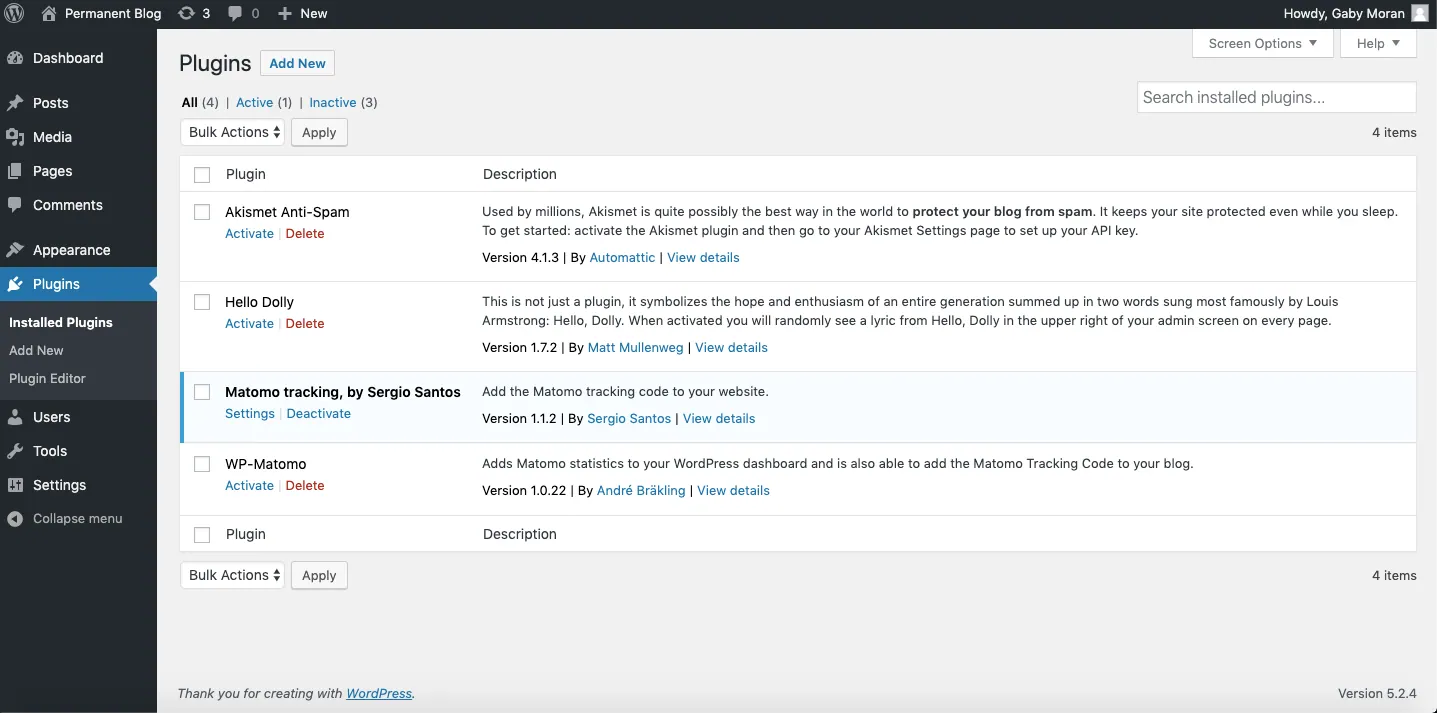
The version number is the proof you need. Open Plugins > Installed Plugins, find WooCommerce and each extension named in an advisory, and compare the version shown with the fixed release for that line. The Stripe advisory listed a patched build for every release line from 9.7.x to 10.8.x, with 10.8.5 the latest, so 10.7.2 was fixed while 10.7.1 was not. Our WooPayments security update guide walks through the same matching process for a more recent advisory.
Then test the store. Place a test order and confirm your payment methods appear at checkout. A working checkout shows the update did not break anything; on its own, the result does not show the vulnerability is gone. A clean result from an external scan such as our WooCommerce health checker has the same limit, because it covers public signals like HTTPS and store page access rather than the versions installed behind the login. If checkout fails after an update, our guide to fixing WooCommerce checkout not working covers the common causes.
PHP sits underneath every store
WooCommerce updates cannot fix the server. The PHP security release in October affected any server running PHP, and stores outside Automattic hosting needed their host to apply it. PHP versions before 8.2 no longer receive security updates from the PHP project.
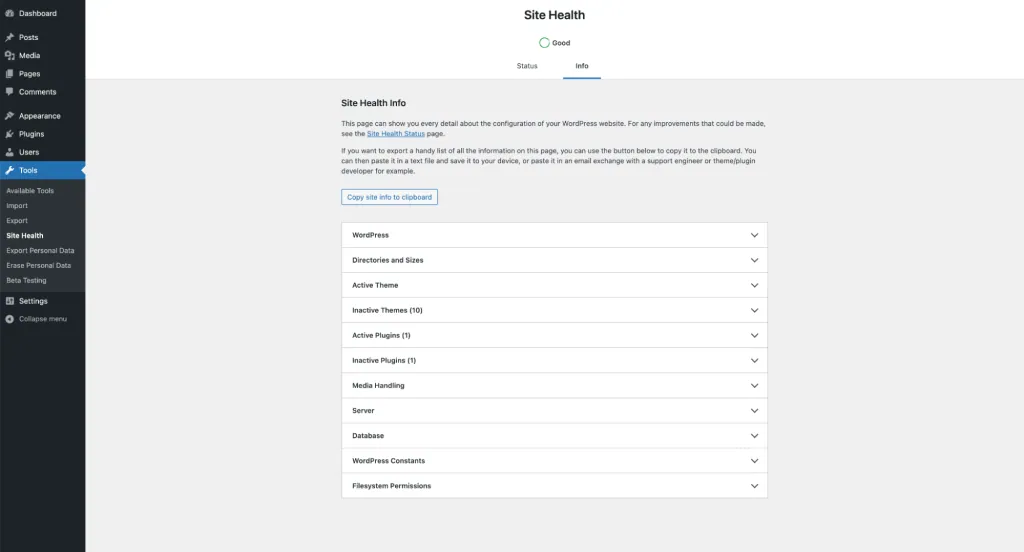
Check your version under Tools > Site Health > Info > Server. WooCommerce 11.5 is the last release supporting PHP 7.4 and 8.0, and WooCommerce 11.6, due in February 2027, requires PHP 8.1 or newer. WooCommerce recommends 8.3 or newer, so plan the move with your host now and ask them to confirm the latest PHP security releases are applied.
A WooCommerce security updates checklist for every store
Run through these steps on each store you manage. One updated site tells you nothing about the others, so publicly accessible staging and development sites count too.
Staging is also the right place to try upcoming releases before they reach customers. When you push tested work back, our guide to moving WooCommerce staging to live without overwriting orders explains how to keep newer orders intact.
- Update WordPress, WooCommerce and your extensions, starting with any named in a current security advisory.
- Open Plugins > Installed Plugins and confirm each installed version matches the fixed release, even where automatic updates are on.
- Confirm the store is connected to WooCommerce.com and that subscriptions for Marketplace extensions are active, so required fixes can reach it.
- Check Tools > Site Health > Info > Server for the PHP version and agree an upgrade path to 8.3 or newer with your host.
- Repeat these checks on staging and development sites that are reachable from the internet.
- Place a test order and confirm payment methods load at checkout.
- Test release candidates of WooCommerce and WordPress on staging so the next patch release causes no surprises.
Sources
WooCommerce security updates FAQs
Do I still need to update WooCommerce manually if automatic updates are on?
Keep updating as normal and check the installed version afterwards. Automatic updates and required installs both depend on conditions being met, and only the version shown under Plugins > Installed Plugins confirms the fix is in place.
Which extensions receive required security updates automatically?
Only WooCommerce Marketplace extensions, on stores running WooCommerce 11.2 or newer that are connected to WooCommerce.com with an active subscription. Extensions bought elsewhere fall outside this mechanism.
How quickly does WooCommerce release a fix for a serious vulnerability?
Critical and High severity fixes go into the next patch release on the current version. Medium and Low severity fixes follow in the patch release after the next minor version, although WooCommerce can ship an important fix in a regular release.
Will an older major version of WooCommerce get security fixes?
Only the most severe issues are considered for backporting to older major versions. Everything else ships in the latest release, so staying on an old major version leaves known issues unpatched.
Can I block required updates on my store?
Yes. A store configured to block automatic updates programmatically still blocks required installs. If you choose that route, you take on the job of watching advisories and updating every site promptly yourself.