How the Backuply vulnerability works
Backuply is a backup, restore and migration plugin with more than 600,000 active installations. Wordfence rated the flaw 8.0 (High) and describes it as a second-order SQL injection affecting version 1.5.8 and earlier. SQL is the language WordPress uses to talk to its database, and second-order means the harmful text is stored during one action and only does damage during a later one.
Planting the payload takes very little effort. Every WordPress user can edit the Biographical Info box on their own profile, so an attacker with a Subscriber account types a crafted value there. When Backuply creates a database backup, that text is saved into the backup file like any other profile detail, and nothing visible happens.
The damage arrives when an administrator restores that backup. A flaw in the old importer picks up part of the biography and runs it as a database command. In the attack Wordfence describes, the command switches on public registration and sets the default role for new accounts to Administrator. The attacker then signs up through the normal registration form and receives full control of the site.
Who should act first
Every site running Backuply 1.5.8 or earlier needs the update, but the risk grows with the number of people who hold accounts. An attacker needs at least a Subscriber login, so sites with open registration, membership areas, online courses or shops where customers create accounts hand strangers that foothold by design. A brochure site with two trusted editors and registration switched off presents a far smaller opening, though updating remains the right move there too.
Timing matters as much as audience. Backups made after a payload was planted carry it with them, and the injected command runs only at restore time. Owners who are about to roll back after a broken update or a hack are the group with the least time to spare.
Update Backuply to 1.5.9 or later
Backuply's developer released 1.5.9 on 1st October 2026, and the changelog lists a security fix to the restoration process, reported through Wordfence. Updating replaces the vulnerable importer, which makes the update the fix that matters most.
Firewall protection follows a separate timetable. Wordfence Premium, Care and Response users received a rule on 24th September 2026, while sites on the free Wordfence plugin get it on 24th October 2026. A firewall rule blocks known exploit attempts without repairing the plugin, so treat it as a backstop rather than a replacement for the update.
- Go to Plugins > Installed Plugins and find Backuply in the list.
- Click Update Now if an update is offered, or use your host's update tool if plugin updates are managed there.
- Confirm the version shown under the plugin name reads 1.5.9 or higher.
- Run a test backup afterwards to confirm the plugin still completes its job.
Check profiles, registration and administrators
With the plugin patched, look at the three places the attack touches. Together these checks show the current state of the site, which is useful evidence even though it is not the whole picture.
Finding an administrator you did not create means the site needs treating as compromised: remove the account, change the passwords of genuine administrators and look for other changes. Our guide to managing WordPress user roles explains how to remove users without losing their posts.
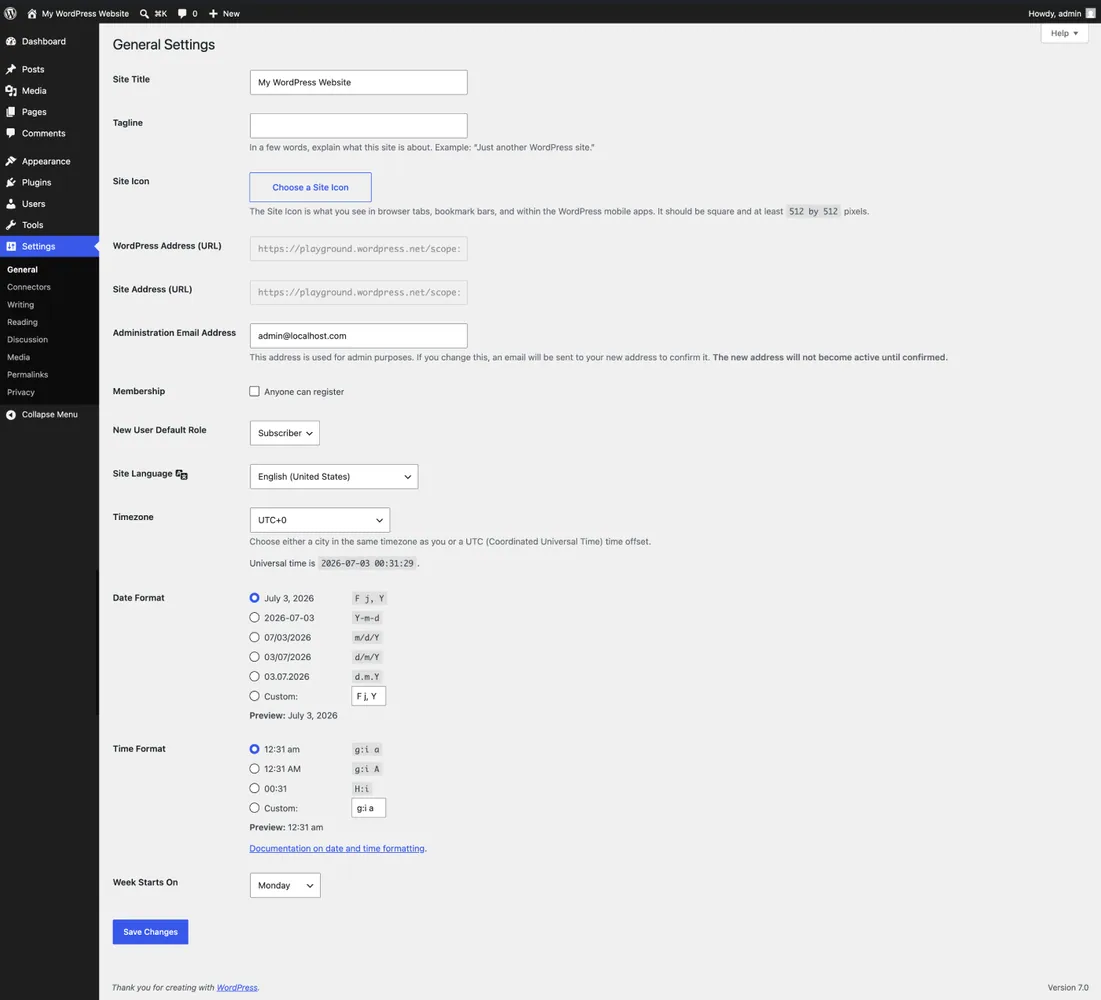
- Open Settings > General. Under Membership, Anyone Can Register should be ticked only if you deliberately allow public sign-ups, and New User Default Role should be Subscriber or another low role you chose. Administrator in that box is a serious warning sign.
- Go to Users > All Users and click the Administrator filter above the list. Every name should belong to someone you recognise, and any recently created account you did not add needs investigating.
- Open the profiles of Subscribers and other low-level users, starting with recent sign-ups, and read the Biographical Info box. A normal biography reads like a sentence about a person. According to Wordfence's analysis, a working payload includes text resembling a CREATE TABLE command for the options table along with the phrase backuply_version, and neither belongs in a biography.
- Clear any suspicious biography, then decide whether that account should exist at all.
Handle older backups before you restore
Any Backuply backup created on 1.5.8 or earlier can contain a planted biography if people with accounts were able to edit their profiles at the time. The 1.5.9 changelog lists a security fix to the restoration process, but the published details do not explain how the patched plugin treats a payload already stored inside an older backup. A restore through 1.5.9 is therefore not proof that the result is clean. An older copy of Backuply still carries the original flaw, which matters when you set up WordPress on a new host, install a saved older version of the plugin and restore from there.
Before restoring, make sure the site doing the work runs Backuply 1.5.9 or later. Straight after any restore, repeat the Settings > General and administrator checks, because registration and the default role are exactly what the published attack changes.
Restored a backup on an older version in recent weeks? Check those settings now and look for accounts registered since that date. A site with altered registration settings or a mystery administrator needs a proper clean-up, and our backup restore service reviews the available backups and agrees a one-off quote before work starts.
What a clean Backuply check proves
A tidy Settings > General page and a familiar administrator list show that the attack has not changed those settings on the live site today. They do not prove that no payload exists. A user can plant a biography, wait for a backup to capture it, then edit the profile back, leaving the live site clean while an older backup still carries the code.
A restore that completes successfully is not evidence that the backup was clean either, because the injected command runs inside the restore itself. The checks afterwards are what reveal whether anything changed. Keep the patched version installed, keep registration and the default role set as you intend, and recheck both every time you restore.
Sources
Backuply vulnerability FAQs
Which Backuply versions are affected by CVE-2026-93953?
Backuply 1.5.8 and every earlier version are affected. Version 1.5.9, released on 1st October 2026, contains the fix to the restoration process.
Can someone exploit the Backuply vulnerability without an account?
No. The attacker needs a Subscriber account or higher to plant the payload, and an administrator must then restore a backup made after it was stored. Open registration makes getting that account easy, which is why membership and shop sites should act first.
Is it safe to restore a backup made before I updated?
Use Backuply 1.5.9 or later, the patched version whose changelog lists a fix to the restoration process. The published details do not confirm how it handles a payload already stored in an older backup, so review user biographies beforehand where you can, then check Settings > General and your administrator list immediately after the restore.
Does the free Wordfence firewall protect my site?
Free Wordfence users receive the firewall rule on 24th October 2026, while paid users received it on 24th September 2026. A firewall rule blocks known attacks but leaves the plugin unchanged, so updating Backuply is the reliable fix.
What should I do if New User Default Role is set to Administrator?
Change it back to Subscriber and untick Anyone Can Register if you do not want public sign-ups. Then review every administrator, remove accounts you did not create, change genuine administrator passwords and treat the site as compromised until you have checked for other changes.