
Distinguish permissions from ownership
A permission value such as 755 or 644 describes access for the owner, its group and other server accounts. Ownership determines which account those rules apply to. The correct number cannot give WordPress the intended access if the files belong to the wrong account.
Values depend on how the host runs PHP. Many setups use 755 for directories and 644 for ordinary files, but these are examples, not instructions to apply across the whole site. Sensitive configuration files and managed hosting can need different values. Never use 777 as a general repair.
1. Record the error and exclude a storage problem
Repeat the failing task once and copy the exact message. An upload message can name a folder under wp-content/uploads; an update failure can identify a plugin directory. Record when it happened and whether it began after a migration, restore or manual file upload.
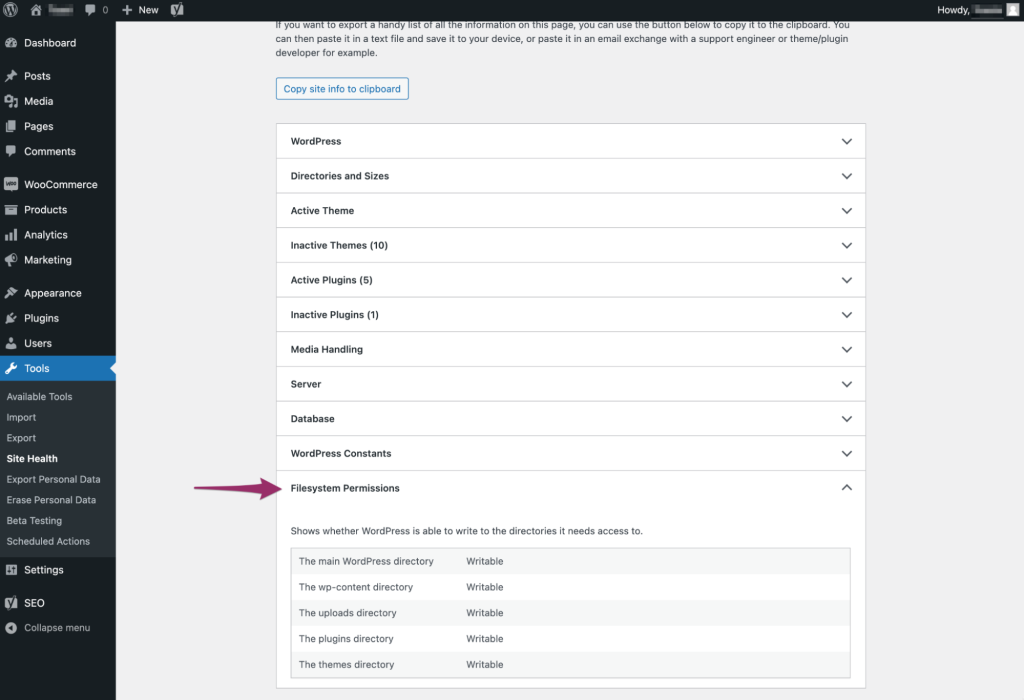
If the dashboard works, open Tools > Site Health > Info > Filesystem Permissions for a read-only summary of whether WordPress can write to its main directories. Record any relevant unwritable location. This does not replace checking the specific failed path or establish that every permission is secure.
Check storage and file-count quotas in your hosting panel. A full account can prevent new files even when access settings are correct. For a 403 response, a firewall or access rule is another possible cause; use the 403 troubleshooting guide if the message does not identify a filesystem problem.
2. Inspect the named file or folder in File Manager
- Sign in to the hosting panel, select the website and open File Manager. Confirm the directory contains this site's WordPress folders before continuing.
- Navigate to the exact path named in the error. For an upload failure, inspect the relevant year/month directory as well as its parent uploads folder.
- Open its Permissions or Change Permissions action. Record the existing numeric value without saving a change. Note the owner and group too if the panel displays them.
- Compare with the host's documentation for this account type. If the path is missing or ownership is unclear, ask support to inspect it rather than creating folders with guessed settings.
3. Correct one confirmed permission setting
Before changing filesystem settings, keep a current backup and your record of the previous value. If the host confirms that the specific uploads directory should be 755 and it is incorrectly restricted, enter 755 for that directory only and save. Use the host's actual recommendation if different.
Leave recursive, apply-to-children and apply-to-all options off for this targeted test. Directories and files need different access rules, and recursively applying one value can break both security and functionality. Do not change wp-config.php as part of an image-upload repair.
Repeat the original upload using a small image you own. If it succeeds, open the image from the Media Library and confirm its public URL loads. If it still fails, stop expanding permissions and investigate ownership or another cause.
4. Have the host repair ownership when needed
A migration can leave files owned by an account that the new server does not use. Ownership changes require knowledge of the host's PHP process and account isolation. Do not copy a command that assigns every file to a generic web-server user.
Send support the exact error, affected path, current permission value and recent change. Ask them to verify the file owner, group and PHP account for this installation, and to repair only the affected scope using their supported scheme. Include available storage information to avoid repeating the first check.
If you cannot save a permission change in File Manager, report that too. It is evidence for the hosting investigation, not a reason to grant public write access. Support should confirm what they changed and why it matches this account's setup.
5. Verify the repaired operation and public site
Repeat the original operation once after the repair. For an update, use the safe update procedure with a backup and staging test. Check the homepage, a page with images and dashboard editing afterwards.
If your own targeted setting caused a new error, restore its recorded previous value and contact the host. Keep the final confirmed values in your maintenance notes. Unexpected changes that recur without a known cause need investigation of the process or account changing them.
Official reference
WordPress explains file permissions, ownership and hosting-dependent differences.
Get help with the next step
If uploads or updates still fail after the host checks ownership, ask BugShield to help investigate file access. Share the error and the host's findings so the next step addresses the unresolved cause.