The release is scheduled for Wednesday, not Thursday
The PHP security team has announced a release for Wednesday, 21st October 2026 at 14:00 UTC, which is 3pm British Summer Time. Its notice describes two critical vulnerabilities, each rated 9.2 under CVSS v4.0, a system for scoring security severity. The team says it can release earlier if technical details emerge or it sees evidence of exploitation.
Treat the official PHP announcement as the timing reference. Earlier reports pointed to Thursday, 22nd October; the vendor's newer notice takes precedence. A host promising to investigate after Thursday is working to the wrong timetable.
What CVE-2026-109618 and CVE-2026-109619 mean for WordPress
The watchTowr FAQ identifies these two CVE numbers as reported PHP remote code execution vulnerabilities. Remote code execution means an attacker can make a system run code they supply. A CVE number is a reference used to track a particular security issue; it does not describe the conditions needed to exploit it.
Public reporting has linked the flaws to a wide range of PHP versions. That is not an official affected-version list. PHP's advance notice does not establish that every WordPress installation is exploitable, name a vulnerable plugin or confirm a working protection rule for site owners. Avoid treating those gaps as reassurance or filling them with guesses.
For your site, the distinction is practical. Updating WordPress, a theme or a plugin does not itself replace the PHP software underneath them. Ask the person responsible for the hosting environment to handle the PHP update. Our PHP and server settings guide explains where that responsibility sits.
Find the PHP version serving each site
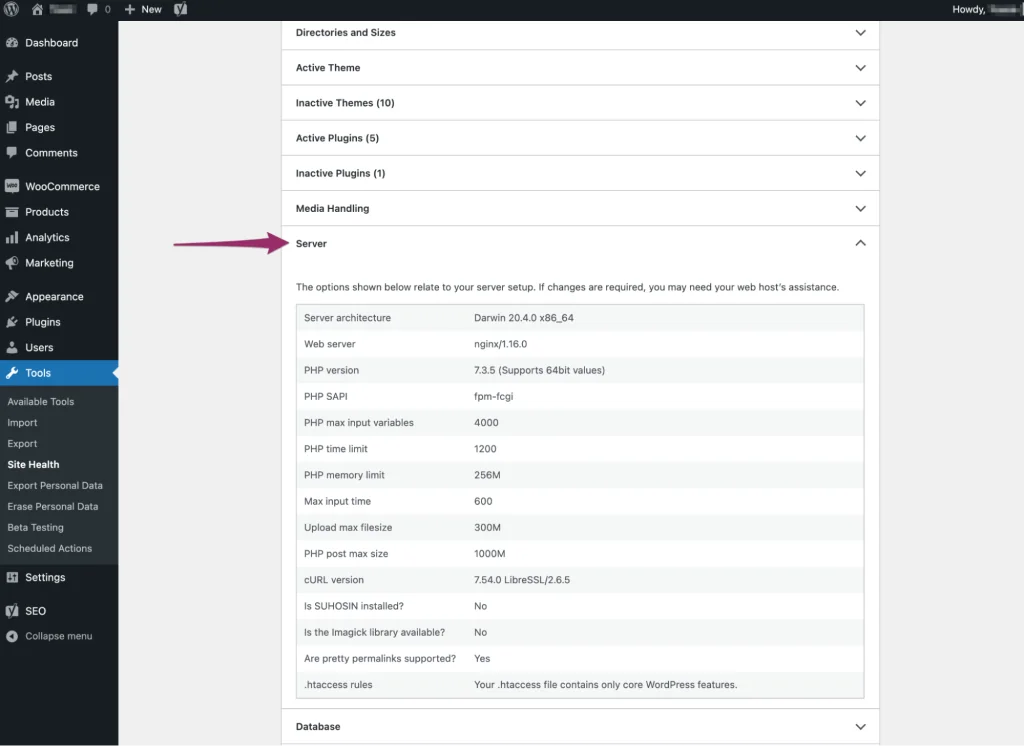
Start inside WordPress at Tools > Site Health > Info > Server. Record the PHP version shown there, the domain and the hosting account it belongs to. WordPress documents the Server panel as part of Site Health's technical information. Repeat this for each site you manage, rather than assuming that every domain on one account has the same settings.
Give that information to your host and ask them to confirm the PHP runtime serving the website. A version obtained from a terminal or a hosting account's default setting is not enough on its own to settle which runtime handles a particular site. Ask the host to resolve any difference between those readings.
Keep the record short: domain, PHP version, host contact, person responsible for the update and confirmation once it is complete. That gives you something concrete to check after release instead of relying on a general announcement from the hosting company. A healthy Site Health status is not proof that these two fixes have been installed.
Get a clear patching commitment from your host
Contact your host before the release and name both CVE identifiers. Explain that you need confirmation for the PHP installation serving your specific domain. Ask when the fixed package will be available, whether they will apply it automatically, and how they will tell you the work is complete.
A useful support request is: Please confirm your deployment plan for the PHP security release covering CVE-2026-109618 and CVE-2026-109619. Which of my sites require action, who will install the fix, and what package or build will confirm that both issues are addressed? Please also confirm whether any restart or action from me is required.
For an unmanaged server, assign that work to whoever maintains its operating system and PHP packages. Do not assume your WordPress developer also manages the server. Establishing an owner now avoids a support ticket being passed between teams when the release arrives.
Check your PHP support status before the release
PHP's support schedule currently lists branches 8.2, 8.3, 8.4 and 8.5. The first two receive security fixes, while 8.4 and 8.5 remain in active support. PHP 8.2 reaches the end of its published security-support period on 31st December 2026.
Those dates describe maintenance support, not which versions contain these vulnerabilities or their fixes. Being on PHP 8.4, for example, does not establish that this release has reached your server. Wait for the advisory and match your host's package information to it.
If your site uses a branch outside that list, ask the host about moving it onto a supported branch and testing compatibility. A major-version move deserves preparation. Our WordPress PHP compatibility checker compares available public WordPress and plugin requirements with a proposed PHP version; it does not test your plugins, reproduce these vulnerabilities or certify that a server is patched.
Prepare a recovery plan before changing PHP
Make sure you can retrieve a recent backup of both the WordPress files and its database. They are different parts of the site: a database export alone does not include your themes, plugins or uploads. The WordPress backup guidance explains that distinction. Check where the backup is stored and who can restore it before you need it.
Use a staging copy to check a planned PHP change where one is available. Decide which functions matter most to your business and write a short test list: signing in, submitting a form, completing a test purchase and running an essential integration. Keep test payments and outbound messages away from real customers.
Agree a recovery route with your host that keeps security in view. If the site breaks after patching, ask for help diagnosing the incompatibility; do not quietly leave it on a vulnerable build as the permanent answer. WordPress's PHP update guidance is a useful starting point for coordinating the change.
After release, verify the fix reached your website
Once the advisory and packages are available, return to the record you made for each domain. Ask your host to confirm that the installed PHP build addresses both CVEs. If they supply a vendor-maintained package with backported fixes, request the corresponding security advisory and package revision rather than judging protection by the displayed PHP version alone.
Then repeat your functional checks and review any new errors with the host or developer. A successful page load shows that the page works; it does not demonstrate that a security fix was installed. Keep the deployment confirmation alongside your test results so those two checks remain distinct.
Preparation starts with a clear owner for the update, a recoverable site and a way to verify the result. If your team needs help with the WordPress checks around a hosting change, BugShield's emergency WordPress support can help you work through them while your hosting provider handles its PHP deployment.
Sources
PHP security update FAQs
When is the PHP security update due?
PHP has scheduled the release for 21st October 2026 at 14:00 UTC, or 3pm UK time. Its security team reserves the right to release earlier. Check the official announcement before making a deployment plan.
Do these CVEs mean every WordPress website is vulnerable?
The available official notice does not establish that. PHP says affected versions and technical details will accompany the release. Record your site's PHP version and have your host assess it against the published advisory.
Will updating WordPress or a security plugin install the PHP fix?
A WordPress or plugin update does not itself update the PHP runtime on the server. Your host or server administrator needs to confirm how the PHP security release will be deployed for your domain.
Where can I check my WordPress site's PHP version?
Open Tools > Site Health > Info > Server and find the PHP version. Send it to your hosting provider with the domain name so they can confirm the runtime and package actually serving that site.
Does the PHP compatibility checker tell me whether these CVEs are fixed?
No. BugShield’s checker reviews public PHP clues and available WordPress and plugin requirements. It does not run compatibility tests on your installed code or verify security patches. Ask your host for the package or build confirmation covering both CVEs.