How Ghostscript connects to your WordPress site
Ghostscript is a document engine. It reads PDF files and turns their pages into images, and it sits quietly underneath many applications that never mention it by name, which is why many site owners run it without knowing they do.
Since WordPress 4.7, core can generate an image of a PDF's first page when it creates attachment details. On a server with the PHP Imagick extension, the chain runs from WordPress to Imagick, then ImageMagick, then Ghostscript. Ghostscript only starts when something asks for a picture of the PDF, so a form that simply saves a file to disk never wakes it up.
According to the Wordfence disclosure, the flaw is a heap buffer overflow: a crafted PDF containing a JPEG 2000 image makes Ghostscript write data past the end of a memory area. The bug lives in Ghostscript itself. WordPress and any form plugin are only the route a file takes to reach it.
Who is exposed to the Ghostscript vulnerability on WordPress
Stock WordPress does not let anonymous visitors upload PDFs to the Media Library. An attack therefore needs a plugin, form, application route or low-privileged account that accepts PDFs. Your site is exposed only when all of the following are true at once:
If visitors or limited users can upload PDFs and you are unsure what happens next, treat the site as affected until your host confirms otherwise. Upload routes deserve attention for other reasons too, as the recent form upload flaws in popular plugins showed.
- A visitor or low-privileged user can upload a PDF.
- Something on the site then asks for a preview or thumbnail of that PDF.
- The server has Imagick, or another tool that calls Ghostscript to make the picture.
- The installed Ghostscript package does not include the fix. Affected code spans Ghostscript 9.21 through 10.07.1 where the OpenJPEG decoder path is present.
Severity, patch status and exploitation status
Artifex fixed the flaw in Ghostscript 10.08.0, released on 8th September 2026. The CVE carries a CVSS 3.1 score of 9.8, which describes a worst case: a network-facing application that accepts PDFs without a login. Successful code execution runs with the permissions of the account processing the PDF, which is not automatically full control of the server.
Wordfence reached unauthenticated remote code execution on one purpose-built WordPress test site. Its two proof-of-concept files worked only against the exact Ghostscript build they were prepared for and failed in 10,240 attempts across ten other package environments. At the time of its disclosure, Wordfence said it had found no public evidence that the flaw was being exploited. Build-specific exploits still matter when many sites share one hosting image, so the right response is to patch rather than wait.
Read the full package revision, not gs --version
Linux distributions add security fixes to the older Ghostscript version they already ship. Ubuntu 22.04, for example, fixed the flaw in a package that still reports Ghostscript 9.55.0, so gs --version alone cannot tell you whether you are patched. Run dpkg -s ghostscript on Debian and Ubuntu, or rpm -q ghostscript on Fedora and the Red Hat family, and compare the full revision with your distribution's advisory.
The Ubuntu advisory (USN-8791-1) and the Debian tracker list these fixed revisions:
Not every release has a fix yet. Debian 12 bookworm, at 10.0.0~dfsg-11+deb12u8, is still listed as vulnerable, and Ubuntu 20.04 and older are marked as needing evaluation. AlmaLinux 10 published a fix on 2nd October 2026. As of 9th October 2026, Fedora 44, Alpine 3.22 and Alpine 3.23 still listed older revisions, so check their current pages. Watch for the release candidate as well, because the 10.08.0 release candidate also reports 10.08.0 but is not fixed.
- Ubuntu 22.04: 9.55.0~dfsg1-0ubuntu5.14
- Ubuntu 24.04: 10.02.1~dfsg1-0ubuntu7.9
- Ubuntu 26.04: 10.06.0~dfsg-3ubuntu1.1
- Debian 13 trixie (security): 10.05.1~dfsg-1+deb13u3. The tracker records the fix as first arriving in 10.05.1~dfsg-1+deb13u2 through DSA-6516-1, so deb13u2 or any later revision from the security repository carries it. The plain trixie package, 10.05.1~dfsg-1+deb13u1, is still listed as vulnerable, so Debian 13 needs the update from the security repository.
What to do now
If your site is on shared or managed hosting where you cannot run package commands yourself, your host's confirmation of what is installed carries the weight, so work through these steps in order:
Sites that run in containers take a different route to the fix, which is why the container step asks for a rebuild. When Wordfence tested an official WordPress Docker image snapshot on 15th September 2026, it contained a vulnerable Ghostscript package, Imagick and a working PDF preview path. Restarting an old container keeps whatever package it was built with, so rebuild from an updated image and check the Ghostscript revision in the image you actually deploy.
- Ask your host whether uploaded PDFs reach Ghostscript through Imagick, and which Ghostscript package revision is installed.
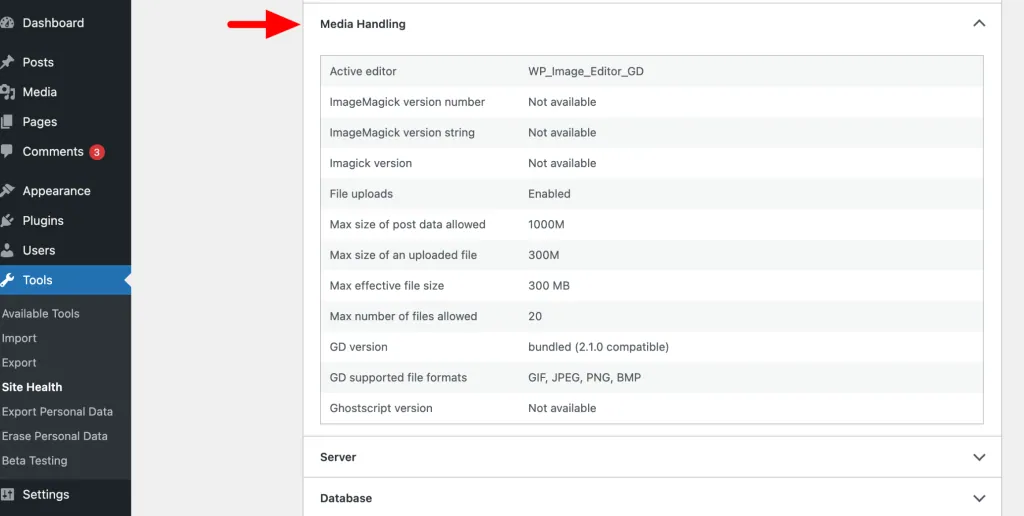
- Open Tools > Site Health > Info > Media Handling to see whether Imagick lists PDF as a supported format. Treat the result as a clue only.
- If you manage the server, install the fixed Ghostscript package from your distribution and follow the vendor or host restart guidance.
- For containers, pull an updated base image, rebuild without relying on cached layers and redeploy.
- Run dpkg -s ghostscript or rpm -q ghostscript again, or ask your host to confirm, and match the revision against the advisory.
Interim protection if you cannot patch yet
Every step above depends on a fixed package being available, so Debian 12 users, along with anyone still waiting on a host, need a stopgap in the meantime. Your strongest option is to stop accepting PDFs from visitors and low-privileged users, which keeps those files away from the converter entirely.
Disabling PDF reads in ImageMagick's security policy also blocks the path, at the cost of PDF previews. On shared or managed hosting, ask your host to make that change, and our guide to PHP and server settings explains how to prepare and test server-level changes with them.
Limiting files per submission and rate-limiting upload forms reduces an attacker's opportunities without closing the hole. WordPress retries a failed PDF preview with a different setting, so one crashing PDF starts two Ghostscript processes, and a failed attempt still returned a successful upload response in Wordfence's test.
Verifying the fix: observation versus proof
A quiet server proves nothing on its own. Wordfence's test PDF rendered without crashing on Debian 12, yet 28 of 40 altered versions of that file did crash it, and Debian 12 remains unpatched. Any single file that fails to crash your site tells you about that file, not about your server.
Proof comes from the installed package revision matching your distribution's fixed version, or written confirmation from your host naming that revision. Site Health showing PDF support confirms only that Imagick recognises the format; it says nothing about ImageMagick policy or the Ghostscript fix. If you would rather have server packages, plugins and upload routes reviewed as part of regular upkeep, our managed updates service covers tested rollouts with backups.
Sources
Ghostscript vulnerability WordPress FAQs
Is there a WordPress plugin update for CVE-2026-39919?
No. The flaw is in Ghostscript, which your operating system, host or container image supplies. The fix arrives as a system package update or a rebuilt container image.
Why does gs --version still show an old number after patching?
Distributions add the fix to the version they already ship. Ubuntu 22.04's fixed package still reports 9.55.0, so check the full revision with dpkg -s ghostscript or rpm -q ghostscript instead.
Is my site safe if nobody can upload PDFs?
If no visitor or low-privileged user can upload a PDF that then gets previewed, this attack route is not open on your site. You should still ask your host to patch, because other tools on the same server can process PDFs.
Has this Ghostscript flaw been exploited against real sites?
At the time of its disclosure, Wordfence said it had found no public evidence that the flaw was being exploited. Its exploits worked on one build-matched test site, which is why patching matters for shared hosting images even without known attacks.
What can Debian 12 users do while bookworm is still listed as vulnerable?
Stop accepting PDFs from untrusted users, ask your host to disable PDF reads in the ImageMagick policy, and rate-limit upload forms. Keep checking the Debian tracker for a fixed bookworm package.